Verdict
Head-to-head · Best Thunderbolt 4 Docks

Kensington SD5780T vs Plugable TBT4-UDZ

Which is the better buy? Side-by-side on rating, price, strengths, and watch-outs — with the published ratings we averaged to get there.

Verdict is reader-supported. As an Amazon Associate we earn from qualifying purchases. Some links on this page are affiliate links — if you click through and buy, we may earn a small commission at no extra cost to you. Our ratings are sourced from independent publications, not sponsors.
The short answer

Kensington SD5780T comes out ahead by a narrow margin (4.2 vs 4.0). The gap is mostly about Buyers building a permanent dual-monitor workstation who want high-resolution display support and a long warranty. — read the strengths below before deciding.

Kensington SD5780T
Higher ratedRanked #3 in Best Thunderbolt 4 Docks
Kensington SD5780T
3 sources1 derived$256.37as of Sep 25

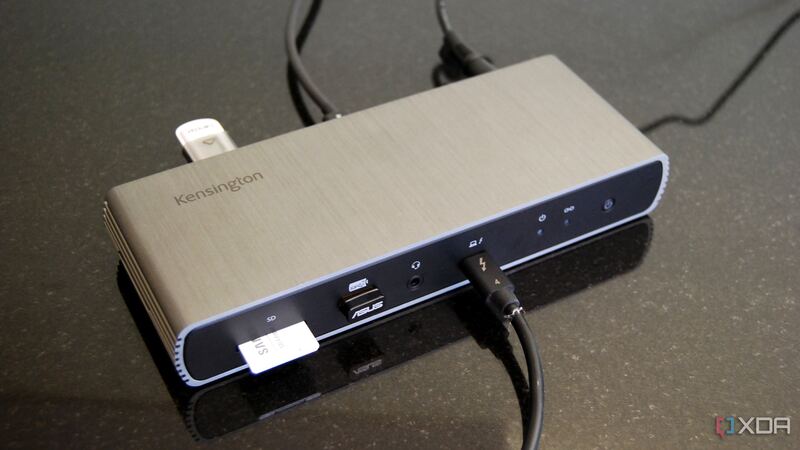
The SD5780T is the display-focused dock: HDMI 2.1 plus Thunderbolt outputs drive dual 4K or 6K monitors, backed by 96W charging and a three-year warranty. Windows Central called it Kensington's best dock yet and XDA marked it Recommended, noting it is well worth it around $300 or less. Its horizontal footprint and original high price are the drawbacks, but recent discounts make it a strong dual-display option.

Strengths
  • — Dual 4K/6K display support with HDMI 2.1 and Thunderbolt outputs
  • — Up to 96W charging for the host laptop
  • — Built-in SD card reader and broad port selection
Watch-outs
  • — Horizontal design takes up more desk space
  • — Originally launched at a high $350-plus price
  • — Fewer total ports than the CalDigit TS4 or Plugable TBT4-UDZ
Plugable TBT4-UDZ
Ranked #5 in Best Thunderbolt 4 Docks
Plugable TBT4-UDZ
2 sources$290as of Sep 25

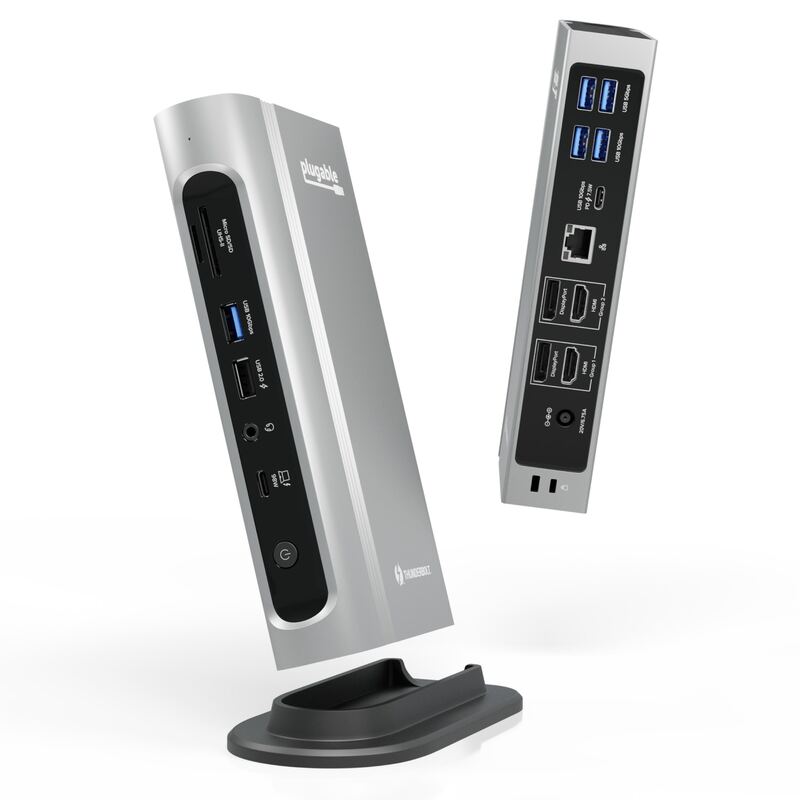
The TBT4-UDZ is the do-everything alternative: a 16-in-1 dock with HDMI, DisplayPort and a generous USB charging spread that earned Laptop Mag's 2025 Dock of the Year. Laptop Mag said it lands just shy of a 5-star score and is one of the best docks it has tested. It is pricier and bulkier than the UD5 sibling, but for a decked-out workstation it rivals the flagships.

Strengths
  • — Huge 16-in-1 port selection rivaling the most loaded docks
  • — Both HDMI and DisplayPort outputs, two of each
  • — Many powered USB ports for charging accessories at the dock
Watch-outs
  • — Falls just short of a 5-star score in expert testing
  • — Larger footprint than slim docks like the Plugable TBT4-UD5
  • — Pricier than the value TBT4-UD5 sibling

Derived means the reviewer published no score, so one was inferred from their written verdict. Everything else is a number the publisher printed. How we rank.

How they stack up

Kensington SD5780T

Leans on display flexibility, pairing HDMI 2.1 with Thunderbolt outputs for dual 4K/6K screens — a step beyond the dual-4K HDMI of the Plugable TBT4-UD5. It carries fewer total ports than the CalDigit TS4 and Plugable TBT4-UDZ, and lacks the downstream Thunderbolt daisy-chaining of the OWC Thunderbolt 4 Dock, but its three-year warranty and higher display ceiling set it apart.

Plugable TBT4-UDZ

The maximalist value play: it nearly matches the CalDigit TS4 on port count while adding HDMI outputs the TS4 lacks, for less money. It is more loaded than its Plugable TBT4-UD5 sibling and the OWC Thunderbolt 4 Dock, and offers more total ports than the Kensington SD5780T, though it is bulkier and pricier than the UD5.

Specs side-by-side

SpecKensington SD5780TPlugable TBT4-UDZ
Ports11 total16 total
ThunderboltThunderbolt 4 (40Gb/s) host + downstreamThunderbolt 4 (40Gb/s) host port
DisplaysDual 4K or 6K (HDMI 2.1 + Thunderbolt)Dual 4K@60Hz (2x HDMI, 2x DisplayPort)
Host ChargingUp to 96W Power Delivery100W Power Delivery
Card ReaderSD card readerSD + microSD
NetworkingGigabit Ethernet2.5GbE Ethernet
Warranty3-year—
CompatibilityWindows, Mac, USB4, Thunderbolt 3Mac, Windows, USB4
Dimensions7.67"L x 2.95"W x 1.18"H4.1"L x 1.4"W x 7.7"H
Wattage96100
USB—7x USB ports
← See the full ranking of best thunderbolt 4 docks