hardwarecanucks found the TUF A15 to be a highly competitive budget gaming laptop that offers strong performance at a lower price point than premium ROG models, though it sacrifices some build quality. ultrabookreview praised its excellent bang-for-buck value and versatile power profiles, while noting the display remains dim compared to higher-tier competitors. mkaugaming highlighted the machine's military-grade durability and ease of upgrades as major selling points for long-term ownership. However, users should be aware that the screen color gamut is limited and some owners have experienced severe system instability requiring clean OS reinstalls.
Full review
MIL-STD-810H durability certification in daily use
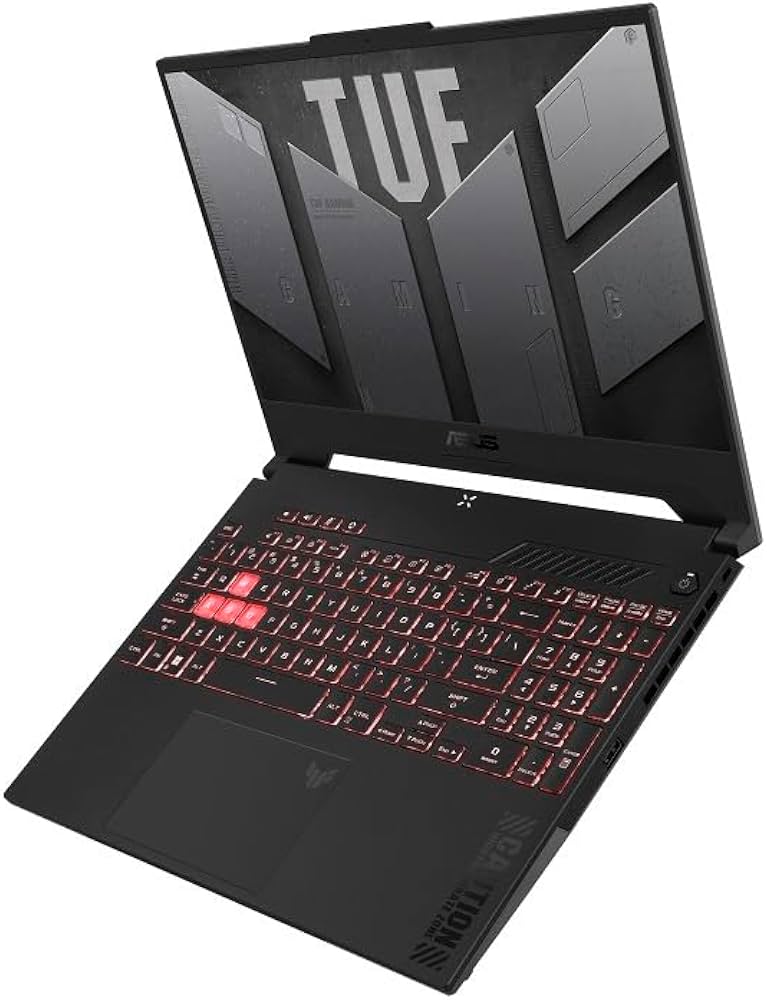
The chassis construction relies heavily on a utilitarian aesthetic that prioritizes resilience over premium materials. The exterior features a sandstone matte grey finish known as Fortress Grey, which hardwarecanucks noted for resisting fingerprints better than glossy alternatives. While the lid incorporates aluminum to reduce weight and flex, the interior deck and bottom panel remain entirely plastic. ultrabookreview confirmed this material split, noting that while the build is not unibody metal, it represents a significant step up from previous generations in terms of rigidity and visual cleanliness.
To earn the TUF Gaming branding, these units must pass MIL-STD-810H military-grade durability tests. mkaugaming verified that test devices are subjected to drops, vibration, humidity, and extreme temperature variations before shipping. This certification ensures the laptop can withstand accidental bumps during commutes or dorm room usage without structural failure. However, this ruggedness comes with ergonomic trade-offs; hardwarecanucks reported a noticeable hinge wobble that becomes distracting when typing on a lap, alongside visible flex in the center of the lid.
The physical design includes specific functional elements like an extruded front lip to assist with one-handed opening and status LEDs positioned beneath the screen. ultrabookreview found these LEDs bright enough to be ignored during movies but noted the always-lit power button as a persistent annoyance in dark environments. The overall footprint remains consistent across recent model years, weighing approximately 2.1 kilograms without the power brick, making it a portable option for students who need a durable machine that survives daily transit.
Keyboard layout compromises and typing experience
The input device features a full-size keyboard with dedicated numeric keypad, which reimarufiles found useful for schoolwork but noted can feel cramped during intense gaming sessions. The WASD keys are highlighted in translucent white to help gamers locate movement controls in low-light environments. However, the arrow keys are significantly smaller than standard size across multiple generations. hardwarecanucks and laptopmedia both flagged this reduction as a potential issue for users with larger hands who rely on precise navigation.
Typing feedback varies by generation but generally leans toward a mushy feel rather than a crisp click. mkaugaming described the keys as having adequate travel distance, while a 2023 model reviewer noted the key travel sits at 1.7mm with a softer actuation that lacks tactile definition. The RGB backlighting is typically single-zone or limited in customization options within the Armory Crate software. One reviewer found that certain lighting effects failed to cycle correctly, defaulting to static red instead of the advertised color cycles.
The trackpad has received consistent praise for its size and responsiveness. hardwarecanucks compared it favorably against competitors like Gigabyte’s Arrow series, noting the smooth plastic finish aids navigation. The presence of dedicated physical left and right buttons is a feature ultrabookreview highlighted as a welcome return to form in an era where many manufacturers are integrating touch-sensitive surfaces that lack tactile confirmation.
Display brightness limits and color gamut coverage
The 15.6-inch FHD IPS panel delivers a smooth 144Hz refresh rate, which ultrabookreview found essential for competitive gaming titles. However, the visual experience is constrained by limited peak brightness. laptopmedia measured the maximum luminance at just 296 nits in the center of the screen and an average of 285 nits across the entire area. This low output makes outdoor usage difficult, as reimarufiles observed that controlling screen visibility indoors becomes a challenge under direct sunlight.
Color reproduction is another weak point for creators or media consumers seeking accuracy. laptopmedia recorded that the panel covers only about 53 percent of the sRGB color gamut. The contrast ratio sits at an acceptable 1130:1, but the color accuracy fails to meet professional standards, with delta E values exceeding 2 even after applying custom calibration profiles. ultrabookreview described the earlier FA506 variant as having a dim and washed-out panel that improved slightly over time but never reached premium levels.
The display is non-touch and matte, which helps reduce glare in indoor environments. Some configurations utilize panels from manufacturers like Innolux or Panda, with slight variations in uniformity. While the high refresh rate ensures fluid motion in fast-paced shooters, the lack of wide color gamut support means this laptop is best suited for gaming rather than photo editing or video production work.
Gaming performance across RTX and Ryzen generations
Performance scales significantly depending on the specific GPU configuration selected. reimarufiles reported that Monster Hunter Wilds was nearly unplayable due to insufficient VRAM causing stutters and low frame rates, though lighter online games like Final Fantasy XIV ran smoothly at high settings. The 4GB of video memory on these base models acts as a hard ceiling for newer AAA releases.
Mid-range configurations with the RTX 2060 or higher offer much more viable gaming experiences. hardwarecanucks found that the Ryzen 7 4800H paired with an RTX 2060 delivered spectacular performance across demanding loads, outperforming comparable Intel models in many benchmarks. mkaugaming tested a model with an RTX 3070 and noted it handled graphic-intensive games without effort, even supporting VR headsets like the HTC Vive for immersive experiences.
The AMD Ryzen processors consistently provide strong multi-core performance for multitasking. ultrabookreview highlighted that the Zen architecture allows the TUF A15 to compete effectively with higher-priced notebooks in productivity tasks while maintaining gaming capabilities. The thermal design manages heat adequately during moderate loads, though heavy sustained gaming pushes the fans into louder territory.
Thermal management and fan noise under load
Heat dissipation relies on a combination of side vents and rear exhaust channels. reimarufiles noted that while overheating incidents were rare, the right-side vent becomes unbearably hot during gameplay, making mouse placement uncomfortable in tight spaces. The chassis design traps some heat within the clamshell when used without external peripherals, prompting mkaugaming to recommend keeping the laptop open even with an external monitor attached to prevent performance throttling.
Fan noise increases noticeably as the system attempts to cool the CPU and GPU during turbo modes. ultrabookreview confirmed that the cooling solution is effective but comes at the cost of acoustic comfort, with noise levels spiking significantly when running games compared to idle states.
The thermal architecture includes dedicated vents near the graphics card exhaust to direct hot air away from the user’s hands. Despite this engineering choice, the surface temperatures around the keyboard deck can rise during extended sessions. Users who prioritize a cool typing experience may need to limit gaming duration or use a cooling pad to assist with airflow.
Battery life efficiency and power delivery
The inclusion of a large 90Wh battery pack allows for impressive endurance during non-gaming activities. laptopmedia recorded that the Zen 3+ processor combined with this capacity yielded over 14 hours of web browsing and nearly 11 hours of video playback using the Windows Better performance setting. mkaugaming also reported an eight-hour runtime under normal usage at fifty percent brightness, describing it as a happy medium between ultrabooks and high-performance machines.
Gaming on battery power drastically reduces this lifespan to less than two hours in most scenarios. The system includes a Battery Care Mode accessible through MyASUS software, which limits charging to eighty percent to prolong overall battery health over time.
Power delivery varies by generation, with newer models supporting faster charging via USB-C up to 100 watts for basic tasks. However, full performance requires the proprietary AC adapter, which weighs nearly one kilogram and adds significant bulk to travel bags. The front-loading port design on some chassis helps keep cables out of the way but can interfere with mouse placement if not managed carefully.
System stability issues and black screen reports
A subset of owners has experienced severe system instability after several months of use. learn.microsoft documented cases where laptops developed random blackouts, freezes, and Blue Screens of Death (BSOD) without clear correlation to CPU or GPU load usage. One user reported that the crashes occurred more frequently when plugged in with a non-full battery, suggesting potential power delivery or driver conflicts rather than pure thermal failure.
Troubleshooting efforts often involve clean Windows installations to remove pre-installed bloatware and OEM drivers. A contributor on learn.microsoft identified that the ASUS-provisioned Windows image was the primary culprit for these crashes, recommending a fresh OS install as the most effective long-term fix. The issue appears sporadic across different hardware configurations, affecting both Ryzen 4000 and later series models.
These stability problems stand in contrast to the otherwise robust build quality and performance metrics reported by professional reviewers. While the MIL-STD certification ensures physical durability, software-level bugs can render the machine unusable for productivity or gaming until resolved. Users experiencing these symptoms are advised to monitor driver updates and consider a clean OS environment if crashes become frequent.
Upgradeability potential and port selection
Internal expansion remains one of the strongest selling points for this lineup. laptopmedia highlighted that two SODIMM slots support up to 64GB of RAM, while dual M.2 PCIe x4 bays allow for extensive storage upgrades. mkaugaming praised the pop-open screw design on the bottom panel, which simplifies access to components without requiring specialized tools or excessive force.
Port selection is comprehensive but heavily biased toward the left side of the chassis. A 2023 model reviewer noted that almost all connections, including USB-A, USB-C, HDMI, and Ethernet, cluster on the left flank, leaving only a single USB port on the right. This arrangement can frustrate left-handed users or those with limited desk space, as cables may interfere with mouse movement.
The connectivity suite includes Wi-Fi 6 cards and Bluetooth 5.3 in newer models, though some reviewers found wireless speeds lagged behind competitors like the TUF A16. The inclusion of a USB4 Type-C port on recent iterations supports DisplayPort output and fast data transfer, while dedicated HDMI ports connect directly to the discrete NVIDIA GPU for optimal gaming performance without integrated graphics bottlenecks.
Strengths
- +MIL-STD-810H durability certification ensures resistance to drops, vibration, humidity, and extreme temperatures.
- +High upgradeability with two SODIMM slots supporting up to 64GB of RAM and dual M.2 PCIe SSD expansion bays.
- +Solid gaming performance from AMD Ryzen processors paired with NVIDIA RTX graphics, handling modern titles effectively at 1080p.
Watch-outs
- −Display color accuracy is limited, covering only about half of the sRGB gamut and showing washed-out colors in some configurations.
- −Keyboard arrow keys are significantly smaller than standard size, which can be distracting for users with larger hands.
- −System stability issues including black screens and BSODs have been reported by owners after several months of use.
Rating sources
Our 4.4 score is the average of the 2 scored reviews above; 4 more reviewed it without printing a score and are not in the average. More about methodology.