Low-profile done properly is the NuPhy Air75 V2's pitch, with solid build quality and wireless flexibility behind it. Tom's Hardware praised the comfortable key switches and premium materials liked the ergonomics and customizable lighting. Reviewers also flagged the limited switch options and the higher cost. Typists who want a quiet, comfortable board will be happy; anyone who prefers tactile or clicky switches should look elsewhere.
Full review
598 grams thanks to a bigger 4000mAh battery
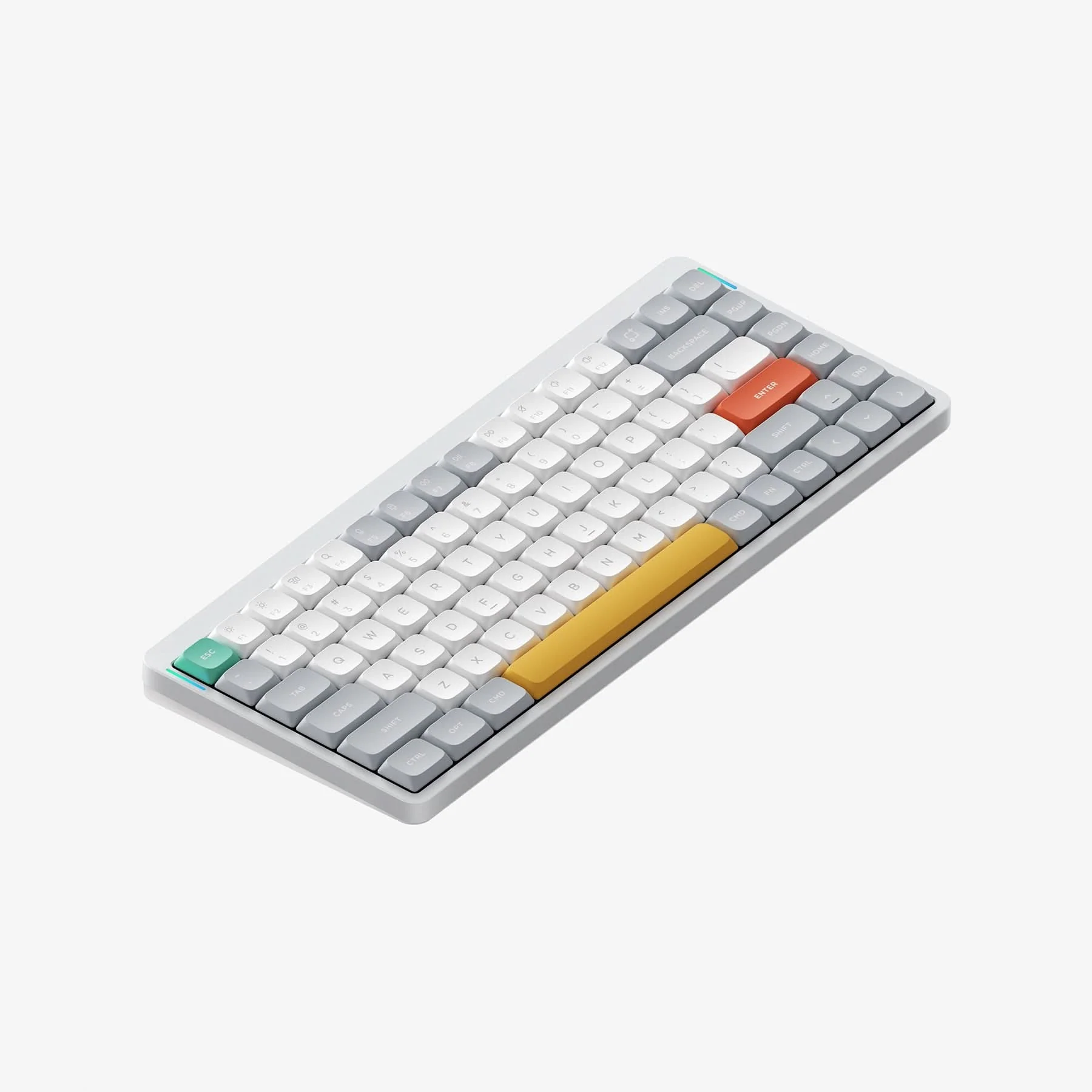
The NuPhy Air75 V2 presents a refined iteration of its predecessor with a more robust construction that addresses earlier concerns about flexing. According to Trusted Reviews, the V2 feels significantly sturdier than the original, with a chassis that resists corner flexing under pressure. The keyboard maintains its signature blend of an aluminium top with translucent plastic underside, available in black, grey, and white colorways. Tom's Hardware noted the weight increase to 598g, attributed to the larger 4000mAh battery, which also contributes to the improved stability. The keycaps have transitioned to double-shot PBT construction, offering better durability compared to the dye-sublimation process used in earlier versions. The keycaps are more resistant to wear and shininess over time, which is a notable improvement for long-term use. The keyboard's dimensions measure 12.5 x 5.2 x 0.59 inches, making it compact yet spacious enough for comfortable typing without a wristrest, as noted by How-To Geek.
Typing Experience and Switch Options
The Air75 V2 delivers a satisfying low-profile typing experience that appeals to both Mac users and mechanical keyboard enthusiasts. How-To Geek praised the keyboard's excellent-feeling keycaps and the fact that it works well without a wristrest, which is particularly appreciated for its portability. The keyboard supports Gateron 2.0 switches and Nuphy x Gateron custom switches, offering a range of tactile and linear options. Trusted Reviews highlighted the availability of Daisy 2.0 switches, including 48g linear options, and noted that the switches provide smooth and consistent keystrokes. However, the key layout adjustments and spacing were noted as potentially problematic for users accustomed to standard layouts, with some reviewers finding the keys closer together than expected. The keyboard's typing angle can be adjusted in three stages (3.5°, 6.5°, and 8.5°), allowing for ergonomic customization.
Connectivity and Battery Performance
Connectivity options on the Air75 V2 are comprehensive, supporting 2.4GHz wireless, Bluetooth, and wired connections. The keyboard's battery life is one of its strongest features, with Trusted Reviews reporting up to 220 hours of usage when lights are off. How-To Geek confirmed this figure, noting that the 4000mAh battery is a significant upgrade from previous models. Tom's Hardware also highlighted the improved battery life, which is crucial for a portable device. The keyboard supports up to four Bluetooth profiles, allowing users to easily switch between devices, a feature that is particularly useful for Mac users. However, the keyboard's polling rate varies by connection type, with 125Hz over Bluetooth, 1000Hz over 2.4GHz, and wired connections. The keyboard's ability to maintain consistent performance across these connection types is a strong point for multitasking users.
Software and Customization
One of the most significant improvements in the Air75 V2 is its support for QMK/VIA customization, a feature that was absent in earlier versions. How-To Geek emphasized the importance of this addition, stating that it allows for extensive customization options that were previously unavailable. While the keyboard supports VIA software, there were some compatibility issues reported on macOS, particularly with getting VIA working properly. Tom's Hardware confirmed that QMK/VIA support is now built-in, which is a major plus for users who want to modify their keyboard's behavior. The keyboard also features a range of backlighting options, though Trusted Reviews criticized the RGB lighting as being a bit of a letdown compared to competitors. The ability to adjust the typing angle and switch between Bluetooth profiles adds to the keyboard's versatility, making it suitable for various use cases.
Praised as a Mac-friendly low-profile keyboard
Reviewers consistently praised the Air75 V2's build quality and typing experience. How-To Geek described it as one of the best low-profile mechanical keyboards on the market, highlighting the great acoustics and satisfying typing feel. Trusted Reviews called it a 'great wireless low-profile mechanical keyboard with noteworthy improvements over its predecessor,' emphasizing the sturdier construction and excellent battery life. The keyboard's ability to work seamlessly with Mac systems was particularly appreciated by Mac users, as noted by Creative Bloq, which described it as a 'Mac-friendly mech keyboard that looks nice, types nice.' RTINGS appreciated the new sound dampening inside the keyboard, which improved acoustics compared to the original model. The keyboard's portability, with its compact design and long battery life, was also a major selling point for users who travel frequently or work in multiple locations.
VIA support has compatibility issues on macOS
Despite its many strengths, the Air75 V2 has several drawbacks that potential buyers should consider. Trusted Reviews pointed out that the RGB backlighting is 'a bit of a let down' compared to what competitors offer, and the lighting doesn't shine through keycaps as effectively as some users might expect. While VIA support is a welcome addition, there were compatibility issues on macOS, which could be frustrating for users who rely heavily on customization. The keyboard's key layout was also criticized by some reviewers for being closer together than expected, potentially causing issues for users accustomed to standard layouts. Additionally, How-To Geek mentioned that the right Shift key is a bit small, which could affect typing comfort for some users. The keyboard's price point, starting at $119.95 for standard switches and $129.95 for Nuphy x Gateron custom switches, may also be a barrier for budget-conscious consumers, especially when compared to alternatives with similar features.
An alternative to the Magic Keyboard for Mac users
The NuPhy Air75 V2 is best suited for Mac users who want a premium, portable mechanical keyboard with excellent battery life and a satisfying typing experience. How-To Geek recommended it for users looking for something more exciting than the Magic Keyboard, while Creative Bloq described it as a 'Mac-friendly mech keyboard' that looks and types nicely. The keyboard's low-profile design and compact form factor make it ideal for users who value portability and ergonomic customization, particularly those who work in multiple locations or travel frequently. The keyboard is suitable for both gaming and productivity tasks, thanks to its support for QMK/VIA customization and multiple Bluetooth profiles. However, it may not be ideal for users who require extensive RGB lighting or those who are heavily invested in Windows-specific customization tools, as some compatibility issues were reported on macOS. The keyboard's price point, while reasonable for its features, may be too high for budget-conscious consumers or those who don't value the premium build quality and customization options.
Bigger battery than the original Air75
When compared to similar products, the Air75 V2 holds its own in terms of build quality and battery life, though it falls short in some areas like RGB lighting. Trusted Reviews compared it to the original Air75 and noted that the V2 offers significant improvements, including a bigger battery, new switches, and proper software support. While the keyboard supports VIA software, it lacks some of the advanced features found in competitors like the Wooting 60HE v2 or the Corsair K70 CORE. However, the Air75 V2's unique selling point is its portability and long battery life, which makes it a strong contender for users who prioritize these features over advanced customization options. The keyboard's ability to work seamlessly with Mac systems also sets it apart from many alternatives that are primarily designed for Windows users.
Switches between four Bluetooth devices
Setup of the Air75 V2 is straightforward, with the keyboard supporting plug-and-play functionality across multiple operating systems including macOS, Windows, Linux, Android, and iOS. How-To Geek noted that the keyboard ships with double-shot PBT keycaps and supports QMK/VIA customization, which simplifies the setup process for users who want to modify their keyboard's behavior. While VIA support is a welcome addition, there were some compatibility issues reported on macOS, which could be frustrating for users who rely heavily on customization. The keyboard's ability to connect via 2.4GHz wireless, Bluetooth, and wired connections provides flexibility for different use cases, and the support for up to four Bluetooth profiles allows users to easily switch between devices. Tom's Hardware confirmed that the keyboard's software support is now built-in, which is a significant improvement over previous models. The keyboard also features a range of adjustment options, including typing angle adjustment and backlighting customization, which enhances the user experience.
Strengths
- +Very low-profile key switches provide a comfortable typing experience with reduced finger fatigue
- +Excellent build quality with a solid aluminum frame and premium materials
- +Wireless connectivity with 2.4GHz and Bluetooth support for versatile use
- +Customizable RGB lighting with software control for personalization
Watch-outs
- −Limited key switch options may not suit all typing preferences
- −Higher price point compared to similar mechanical keyboards
How it compares
The NuPhy Air75 V2 provides a unique low-profile typing experience that the Keychron Q1 Max and Drop CTRL do not offer, but it lacks the RGB lighting and hot-swap support of the Keychron Q1 HE and Royal Kludge RK84. While it's more comfortable than the Mode SixtyFive, it's less customizable and lacks the tactile feedback of the Glorious GMMK Pro, making it ideal for users seeking quiet, ergonomic typing.
Rating sources
Our 4.0 score is the average of these published ratings. More about methodology.