The Archer BE800 is the value flagship. Tom's Guide called it 'the fastest and most capable traditional router available,' and XDA scored it 8/10 for reliable, high-throughput Wi-Fi 7. Dual 10Gbps ports plus four 2.5Gbps ports give it a strong multi-gig backbone, and it held up flawlessly under heavy mixed load. There is less gaming-branded software here than on ASUS gear, but the raw speed and the value make it a top gaming pick.
Full review
Gaming Performance
The Archer BE800 earns its place on raw speed. Tom's Guide declared it "the fastest and most capable traditional router available, at least for now," backing that with a measured 3.364Gbps to a OnePlus 11 phone positioned next to the router. For a gamer, that close-range Wi-Fi 7 throughput means a wireless connection fast and stable enough to rival wired for most titles.
Reliability under load is the other half of the gaming story, and the BE800 delivered. XDA reported that "the overall reliability of the network was high and handled over a week of TV streaming, PS5 downloading, and video calling without dropping the connection." A router that stays rock-solid while a console downloads in the background and others stream is exactly what a busy gaming household needs.
Ports and Connectivity
The wired loadout is a standout. As XDA detailed, "there are two 10Gbps ports, with one of them working as Ethernet or SFP+, four 2.5Gbps Ethernet ports, and a USB 3.2 port." That dual-10Gbps backbone matches the flagship ASUS on the wired front and future-proofs the network for multi-gig internet and fast local transfers.
Four 2.5GbE LAN ports give plenty of high-speed wired connections for consoles, a gaming PC and a NAS, so latency-sensitive devices can skip Wi-Fi entirely. For a wired-first gamer, the BE800's port selection is genuinely flagship-grade.
Design and Software
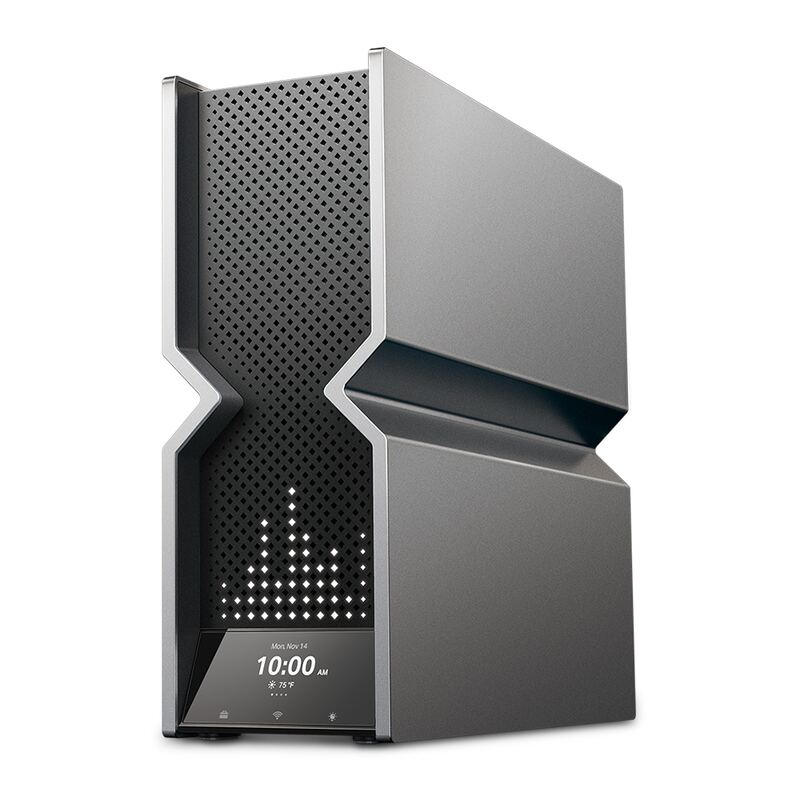
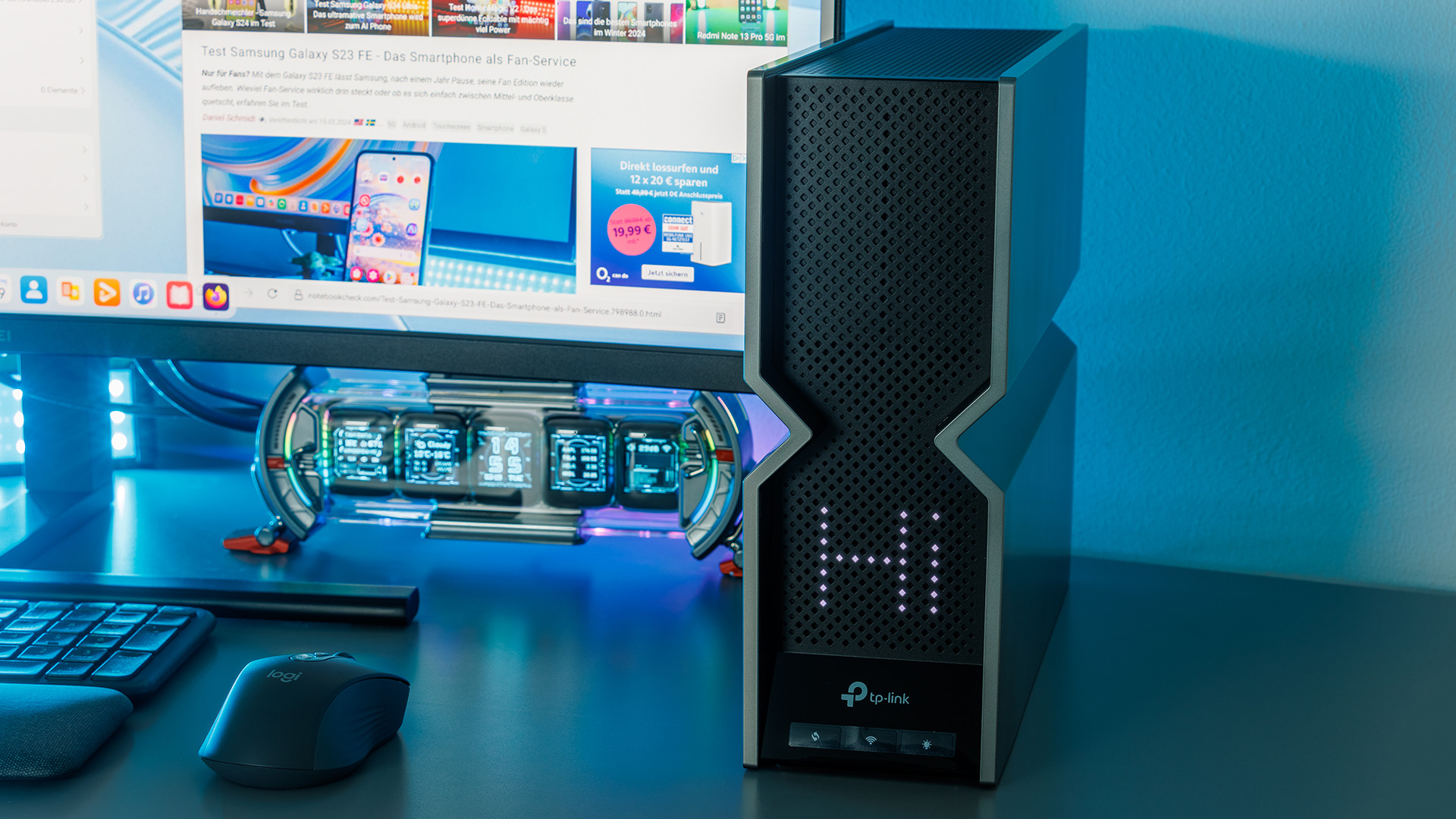
The BE800 is one of the more distinctive routers on the market, a tall tower with a customizable LED matrix info screen on the front that can show network status or custom graphics. It is a design statement as much as a router, and the build quality matches the premium price.
On software, TP-Link's HomeShield and EasyMesh cover security and mesh expansion well, and the BE800 supports performant mesh growth as your home gets larger. The one gap versus the ASUS ROG models is depth of gaming-specific tuning — the BE800 leans on overall speed and reliability rather than a dedicated gaming-software suite.
$200 cheaper than the ASUS flagship
Dong Knows Tech framed the BE800 as "one of the best values" among early Wi-Fi 7 routers, and that is the crux of its appeal. At around $550-600 it costs meaningfully less than the $799 ASUS ROG Rapture GT-BE98 Pro while delivering comparable Wi-Fi 7 throughput and an equivalent dual-10Gbps wired backbone.
For a gamer who wants flagship-class speed without flagship-class spending, the BE800 is the sweet spot. You trade some gaming-specific software polish for a price that is several hundred dollars lower, which is an easy call for most buyers.
Lighter gaming software than the ASUS suite
The BE800 is still expensive in absolute terms — among the priciest traditional home routers — so it only makes sense for buyers with Wi-Fi 7 devices and multi-gig needs. Its gaming software is lighter than the ASUS ROG suite, lacking the granular Open NAT and game-acceleration tooling enthusiasts may want.
The 6GHz range limitation common to all Wi-Fi 7 routers applies here too, and the tall chassis takes up real shelf space. None of these undercut its strong second-place standing, but they explain why a dedicated gamer chasing software depth might still prefer the ASUS flagship.
A safer buy than the TP-Link BE900
The BE800 is the value answer to the ASUS ROG Rapture GT-BE98 Pro: comparable Wi-Fi 7 speed and a matching dual-10Gbps wired backbone for several hundred dollars less, minus the deepest gaming software. Against the Netgear Nighthawk RS700S it is cheaper and faster up close, and it is a far safer, more proven buy than the TP-Link Archer BE900, which drew more skeptical reviews. The Wi-Fi 6 ASUS ROG Rapture GT-AX11000 sits a generation behind it on standards.
Coverage and Setup
The BE800's tri-band BE19000 design is built to cover a whole home, and its eight internal antennas radiate evenly from the tall tower chassis. Setup runs through TP-Link's Tether app, which walks users through getting online quickly, and the front LED screen can surface network status at a glance — a genuinely useful touch when troubleshooting.
EasyMesh support means you can pair the BE800 with compatible TP-Link nodes to extend coverage into a larger home or around dead spots, growing the network without replacing the router. For a gamer who starts in one room and later wants whole-home Wi-Fi 7, that expansion path adds long-term value.
Near-flagship speed without the flagship price
Choose the Archer BE800 if you want near-flagship Wi-Fi 7 speed and a strong multi-gig wired backbone for gaming without paying top ASUS ROG prices, and you do not need an elaborate gaming-software suite. It is ideal for a fast, reliable, future-proof home network. Step up to the GT-BE98 Pro for the deepest gaming features and dual 10GbE, or down to the GT-AX11000 if Wi-Fi 6 suffices and value is paramount.
Strengths
- +Among the fastest traditional routers tested, with strong 6GHz Wi-Fi 7 speed
- +Dual 10Gbps ports (one SFP+) plus four 2.5Gbps Ethernet ports
- +Distinctive design with a customizable LED info screen
- +Reliable under heavy mixed load (gaming, streaming, downloads at once)
- +EasyMesh support for performant mesh expansion
Watch-outs
- −Expensive among traditional home routers at around $550-600
- −Less gaming-specific software than the ASUS ROG models
- −6GHz range is limited, as with all Wi-Fi 7 routers
- −Large, tall chassis takes up shelf space
How it compares
The value-flagship of the group: it delivers Wi-Fi 7 speed approaching the pricier ASUS ROG Rapture GT-BE98 Pro for less money, with dual 10Gbps ports that match it on the wired front. It is a safer, more proven buy than the TP-Link Archer BE900, and a generation ahead of the Wi-Fi 6 ASUS ROG Rapture GT-AX11000, though it lacks the deep gaming software of the ASUS ROG models.
Rating sources
“The overall reliability of the network was high and handled over a week of TV streaming, PS5 downloading, and video calling without dropping the connection.”
“TP-Link's Archer BE800 is the fastest and most capable traditional router available, at least for now.”
Our 4.2 score is the average of these published ratings. More about methodology.