Verdict
Head-to-head · Best Docking Stations

Dell WD25TB4 Thunderbolt Dock vs Satechi Dual Dock Stand

Which is the better buy? Side-by-side on rating, price, strengths, and watch-outs — with the published ratings we averaged to get there.

Verdict is reader-supported. As an Amazon Associate we earn from qualifying purchases. Some links on this page are affiliate links — if you click through and buy, we may earn a small commission at no extra cost to you. Our ratings are sourced from independent publications, not sponsors.
The short answer

Dell WD25TB4 Thunderbolt Dock comes out ahead by a narrow margin (4.3 vs 4.0). The gap is mostly about Dell laptop users seeking enhanced productivity — read the strengths below before deciding.

Dell WD25TB4 Thunderbolt Dock
Higher ratedRanked #3 in Best Docking Stations
Dell WD25TB4 Thunderbolt Dock
4 sourcesall derived$231.99as of Aug 3

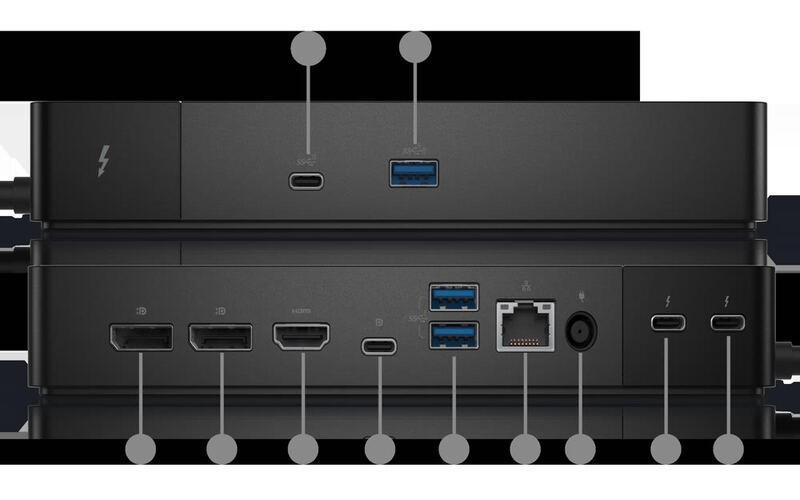
Dell laptop owners are the whole audience for the WD25TB4 Thunderbolt Dock, which supports dual 4K displays, fast USB-C charging, and a modular upgrade system. Laptop Mag, reviewing the previous-generation WD22TB4, praised that dock's 'unrivaled power delivery' and 'excellent performance,' and Mini PC Reviewer highlighted its 'sturdy design' and 'seamless integration.' Compatibility is restricted to Dell devices, and reviewers noted limited USB-A ports plus occasional coil whine. Professionals who want more connectivity out of a Dell machine will benefit; anyone on another brand or needing lots of legacy ports should look elsewhere.

Strengths
  • Supports dual 4K displays at 60Hz for enhanced multitasking and productivity
  • Fast USB-C charging with SuperBoost technology reduces downtime
  • Modular design allows easy upgrades with swappable modules for future technology
Watch-outs
  • Full 130W charging and Dell-specific features need a Dell laptop; other Thunderbolt 4 hosts are capped at 96W
  • Only two USB-A ports available, which may be insufficient for some users
  • Some users reported coil whine noise under specific conditions
Satechi Dual Dock Stand
Ranked #8 in Best Docking Stations
Satechi Dual Dock Stand
3 sources$349.99as of Aug 1

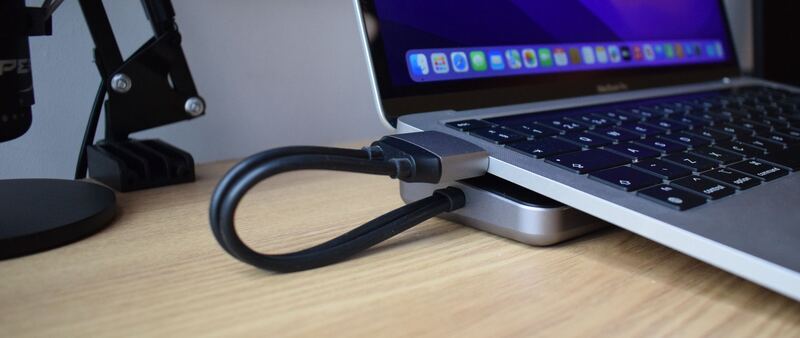
The Satechi Dual Dock Stand is a zero-footprint docking station that raises your laptop into a comfortable typing angle while adding nine expansion ports and an integrated NVMe SSD enclosure. Macworld gave it 4/5, praising the build quality and unique storage feature; How-To Geek rated it 8/10 for its clean aluminum design matching Apple products. At $169.99 direct from Satechi (historically as low as ~$125 on sale), it's ideal for MacBook users who want dual external displays, Ethernet, and extra storage in one compact unit.

Strengths
  • Nine total ports including dual HDMI 2.1, DisplayPort 1.4, and Gigabit Ethernet for a complete workstation setup
  • Integrated NVMe/SATA SSD enclosure on the underside — expands laptop storage without adding another drive
  • 75W USB-C PD pass-through keeps MacBook or Windows laptops charged while connected
Watch-outs
  • No SD card reader or built-in device charging on the data ports
  • M1/M2 MacBooks limited to single external display in extended mode (hardware limitation)

Derived means the reviewer published no score, so one was inferred from their written verdict. Everything else is a number the publisher printed. How we rank.

How they stack up

Dell WD25TB4 Thunderbolt Dock

The Dell WD25TB4 excels in dual 4K display support and SuperBoost charging but is limited to Dell devices, unlike the CalDigit TS4 which supports any Thunderbolt laptop. While it offers a modular design that the Anker 563 lacks, it only provides two USB-A ports compared to the Anker's more extensive port selection. The UGREEN Revodok Max surpasses it in Thunderbolt 4 performance and build quality, though the Dell dock offers better integration with Dell laptops and more reliable power delivery.

Satechi Dual Dock Stand

The Satechi Dual Dock Stand is more compact than the CalDigit TS4 and Dell D6000, with a unique built-in SSD enclosure neither offers. It's less expensive than the HyperDrive 12 but supports only dual (not triple) displays. Compared to the UGREEN Revodok Pro, it adds Ethernet and an NVMe bay at a higher price point.

Specs side-by-side

SpecDell WD25TB4 Thunderbolt DockSatechi Dual Dock Stand
Power Delivery130W75W USB-C PD 3.0 passthrough
Ports2
Display SupportDual 4K@60Hz
Ethernet10GbEGigabit Ethernet
USB SpeedUSB 3.2 Gen 2
Thunderbolt4
Weight0.99 lb
Audio3.5mm Combo Jack
Dimensions12"L x 12"W x 3"H
Wattage180 watts
Host ConnectionDual USB-C
USB-A Ports2x USB-A (10Gbps + 5Gbps)
USB-C Ports2x USB-C data (10Gbps + 5Gbps) + 1x PD passthrough (75W)
Display OutputsHDMI 2.1 x2 (4K@60Hz), DisplayPort 1.4
SSD EnclosureNVMe/SATA M.2 2242/2260/2280 (10Gbps NVMe, 6Gbps SATA)
Build MaterialAluminum
← See the full ranking of best docking stations