Verdict
Head-to-head · Best Docking Stations

Dell WD25TB4 Thunderbolt Dock vs UGREEN Revodok Pro USB-C Dock

Which is the better buy? Side-by-side on rating, price, strengths, and watch-outs — with the published ratings we averaged to get there.

Verdict is reader-supported. As an Amazon Associate we earn from qualifying purchases. Some links on this page are affiliate links — if you click through and buy, we may earn a small commission at no extra cost to you. Our ratings are sourced from independent publications, not sponsors.
The short answer

Dell WD25TB4 Thunderbolt Dock comes out ahead by a clear margin (4.5 vs 4.2). The gap is mostly about Dell laptop users seeking enhanced productivity — read the strengths below before deciding.

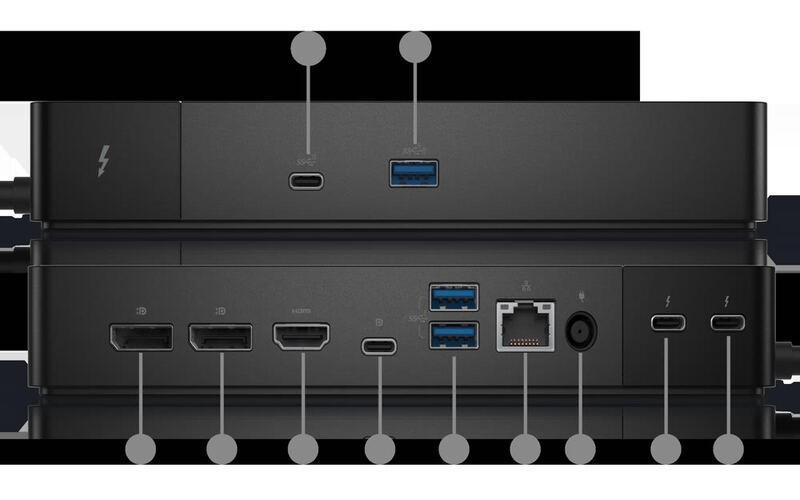
Dell WD25TB4 Thunderbolt Dock
Higher ratedRanked #3 in Best Docking Stations
Dell WD25TB4 Thunderbolt Dock
2 sourcesall derived$265as of Oct 4

Dell laptop owners are the whole audience for the WD25TB4 Thunderbolt Dock, which supports dual 4K displays and fast USB-C charging. Compatibility is restricted to Dell devices, and some users reported occasional coil whine. Professionals who want more connectivity out of a Dell machine will benefit; anyone on another brand or needing lots of legacy ports should look elsewhere.

Strengths
  • — Supports dual 4K displays at 60Hz for enhanced multitasking and productivity, per DockSelector
  • — 130W power delivery for Dell laptops with reliable charging performance, according to docking-stations.info
Watch-outs
  • — Full 130W charging and Dell-specific features need a Dell laptop; other Thunderbolt 4 hosts are capped at 96W, as DockSelector notes
  • — Some users reported coil whine noise under specific conditions
UGREEN Revodok Pro USB-C Dock
Ranked #5 in Best Docking Stations
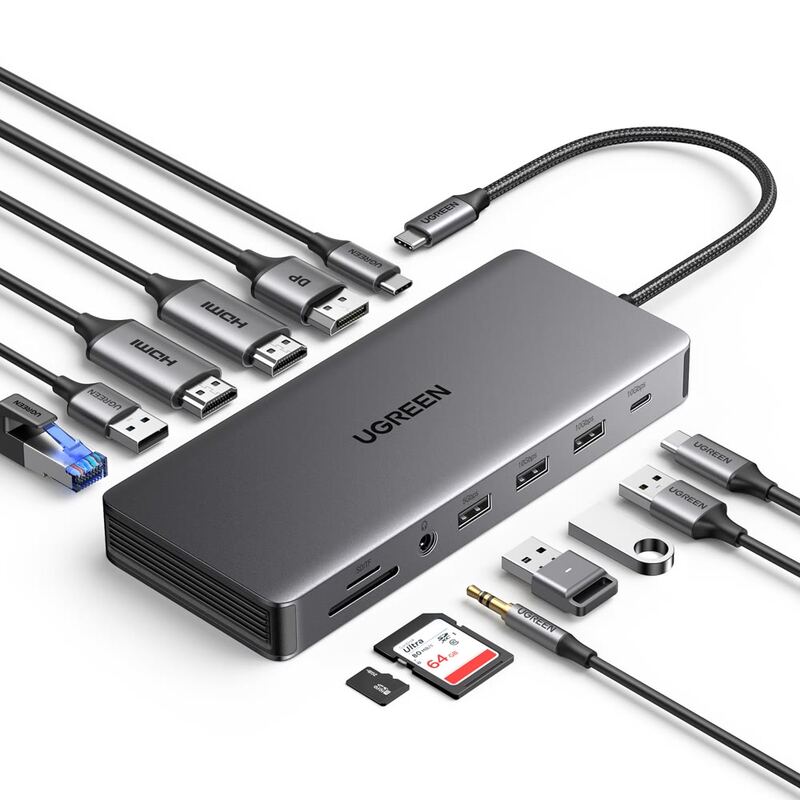
UGREEN Revodok Pro USB-C Dock
9 sources$17as of Oct 3

Triple-display support is the UGREEN Revodok Pro 13-in-1's headline: 4K at 60Hz on two ports and 8K at 30Hz on a third, at a price well under premium Thunderbolt docks. PCWorld's Mark Hachman praised its 'excellent performance' and 'great value for the money,' while XDA's Brady Snyder called it a 'good mix of price and performance.' Reviewers flagged the short built-in cable and the requirement for a separate power supply. It works best with modern laptops and Apple Silicon Macs, and compatibility with older Intel Core systems is uncertain. Power users running multiple displays are the fit, with those requirements attached.

Strengths
  • — Excellent triple-display support with 4K at 60Hz on two ports and 8K at 30Hz on one port
  • — Great value for money compared to premium Thunderbolt docks
  • — Optimized build with multiple connectivity options including HDMI, DisplayPort, USB-A, USB-C, Ethernet, and SD/TF slots
Watch-outs
  • — Built-in USB-C cable is short and requires separate power supply
  • — Not fully compatible with older 11th-gen Intel Core laptops
  • — Included cables aren't long enough for some setups

Derived means the reviewer published no score, so one was inferred from their written verdict. Everything else is a number the publisher printed. How we rank.

How they stack up

Dell WD25TB4 Thunderbolt Dock

The Dell WD25TB4 excels in dual 4K display support but is limited to Dell devices, unlike the CalDigit TS4 which supports any Thunderbolt laptop. The UGREEN Revodok Max surpasses it in Thunderbolt 4 performance and build quality, though the Dell dock offers better integration with Dell laptops and more reliable power delivery.

UGREEN Revodok Pro USB-C Dock

The UGREEN Revodok Pro offers triple-display support with 8K output, a feature not matched by the HyperDrive 12 or Dell D6000. It's more affordable than the CalDigit TS4 Thunderbolt Dock but lacks Thunderbolt ports and has a short built-in cable. Unlike the Satechi 15-in-1, it provides Ethernet and SD card readers, though it's less portable and doesn't offer wireless charging.

Specs side-by-side

SpecDell WD25TB4 Thunderbolt DockUGREEN Revodok Pro USB-C Dock
Power Delivery130WPD 3.0 100W
Display SupportDual 4K@60Hz—
Ethernet10GbE2.5 Gbps
USB SpeedUSB 3.2 Gen 2—
Thunderbolt4—
Weight0.99 lb—
Audio3.5mm Combo Jack—
Dimensions12"L x 12"W x 3"H—
Wattage180 watts—
Host Connection—USB-C
USB-A Ports—4
USB-C Ports—1
Display Outputs—3x (2x 4K@60Hz, 1x 8K@30Hz)
Card Slots—SD/TF slots
Build Material—Aluminum Alloy
← See the full ranking of best docking stations