Verdict
Head-to-head · Best Graphics Drawing Tablets

Huion Kamvas 16 (Gen 3) vs Wacom Cintiq Pro 27

Which is the better buy? Side-by-side on rating, price, strengths, and watch-outs — with the published ratings we averaged to get there.

Verdict is reader-supported. As an Amazon Associate we earn from qualifying purchases. Some links on this page are affiliate links — if you click through and buy, we may earn a small commission at no extra cost to you. Our ratings are sourced from independent publications, not sponsors.
The short answer

Wacom Cintiq Pro 27 comes out ahead by a narrow margin (4.2 vs 4.3). The gap is mostly about Professional illustrators, animators and colorists who need a reference-grade 4K pen display and will use it as both a drawing surface and a calibrated monitor. — read the strengths below before deciding.

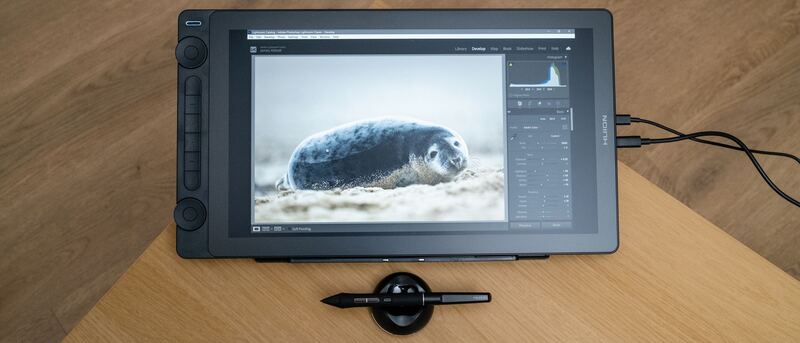
Huion Kamvas 16 (Gen 3)
Ranked #3 in Best Graphics Drawing Tablets
Huion Kamvas 16 (Gen 3)
3 sources1 derived$459as of Aug 1

The Huion Kamvas 16 (Gen 3) is the standout mid-range pen display, pairing a sharp 2.5K QHD screen with a high-end 16,384-level PenTech 4.0 pen and on-device dials. Creative Bloq praised its unique control-heavy design and Digital Camera World called it good enough for professional use. Modest brightness and added bulk are the trade-offs.

Strengths
  • Crisp 15.8-inch 2.5K QHD (2560x1440) display with full lamination
  • High-spec PenTech 4.0 pen with 16,384 pressure levels
  • Strong color: 99% sRGB, 99% Rec.709, ~90% Adobe RGB with low Delta-E
Watch-outs
  • Not a standalone device; must connect to a computer or Android phone
  • 200-nit brightness is modest for bright rooms
  • Bulkier design than streamlined rivals due to the added controls
Wacom Cintiq Pro 27
Higher ratedRanked #1 in Best Graphics Drawing Tablets
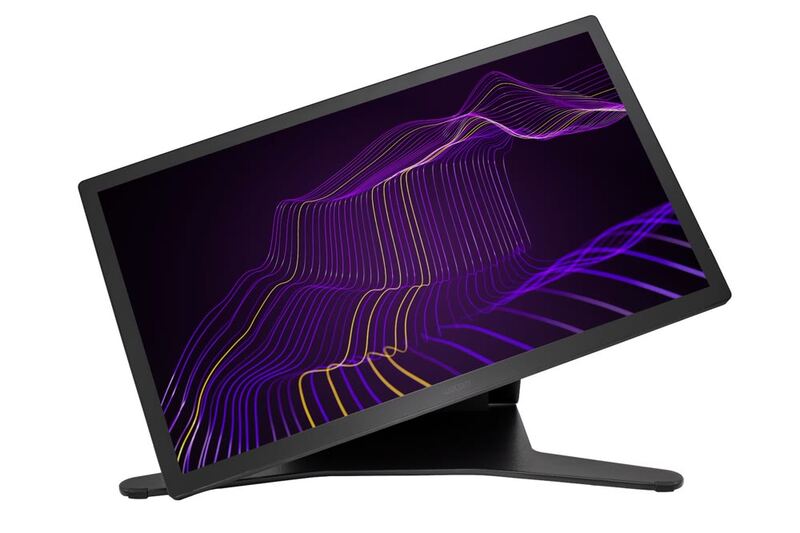
Wacom Cintiq Pro 27
3 sources2 derived$3,499.95as of Aug 1

The Wacom Cintiq Pro 27 is the flagship pen display for professionals, pairing a 4K 120Hz screen with reference-grade color and the superb Pro Pen 3. TechRadar called it a real workflow accelerator for creatives and PetaPixel deemed it a worthwhile double-duty investment. The towering $3,499 price, fan noise and size are the trade-offs.

Strengths
  • Stunning 26.9-inch 4K UHD display with 120Hz refresh, a first for Wacom
  • Reference-grade color: 99% Adobe RGB, 98% DCI-P3, Pantone Validated
  • Customizable Pro Pen 3 with 8,192 pressure levels is the most accurate Wacom pen yet
Watch-outs
  • Extremely expensive at around $3,500
  • Audible fan noise when powered on
  • Multi-touch can be overly sensitive and interfere with pen strokes

Derived means the reviewer published no score, so one was inferred from their written verdict. Everything else is a number the publisher printed. How we rank.

How they stack up

Huion Kamvas 16 (Gen 3)

The mid-range pick: its 16,384-level PenTech 4. 5K screen sits below the 4K Kamvas Pro 24 and Wacom Cintiq Pro 27; it adds a screen the XP-Pen Deco Pro MW lacks.

Specs side-by-side

SpecHuion Kamvas 16 (Gen 3)Wacom Cintiq Pro 27
Screen Size15.8-inch26.9-inch
Resolution2.5K QHD (2560x1440)4K UHD (3840x2160)
Color Gamut99% sRGB, ~90% Adobe RGB99% Adobe RGB, 98% DCI-P3
PenPenTech 4.0, 16,384 levelsPro Pen 3, 8,192 levels
LaminationFull lamination, anti-sparkle glassFull lamination, anti-glare glass
Controls2 dials + 6 Quick Keys8 ExpressKeys + dual dial wheel
Brightness200 nits500 nits
ConnectivityUSB-C, Android-compatibleUSB-C, HDMI, DisplayPort
TouchNo touch inputMulti-touch
TiltTilt recognition supported20 degrees
ExtrasDual dial controllers
CompatibilityWindows, macOS, Android, Chrome OS, LinuxWindows, macOS, Android, Chrome OS, Linux
TypePen displayPen display
Refresh Rate120Hz
ValidationPantone Validated
Active Area27 inches
WirelessBluetooth 5.0
← See the full ranking of best graphics drawing tablets