Verdict
Head-to-head · Best Mechanical Keyboards Under $100

Keychron V1 vs Logitech G413

Which is the better buy? Side-by-side on rating, price, strengths, and watch-outs — with the published ratings we averaged to get there.

Verdict is reader-supported. As an Amazon Associate we earn from qualifying purchases. Some links on this page are affiliate links — if you click through and buy, we may earn a small commission at no extra cost to you. Our ratings are sourced from independent publications, not sponsors.
The short answer

Keychron V1 comes out ahead by a clear margin (5.0 vs 3.7). The gap is mostly about Enthusiasts seeking deep customization and wireless flexibility on a budget — read the strengths below before deciding.

Keychron V1
Higher ratedRanked #1 in Best Mechanical Keyboards Under $100
Keychron V1
1 source$74.99as of Aug 1

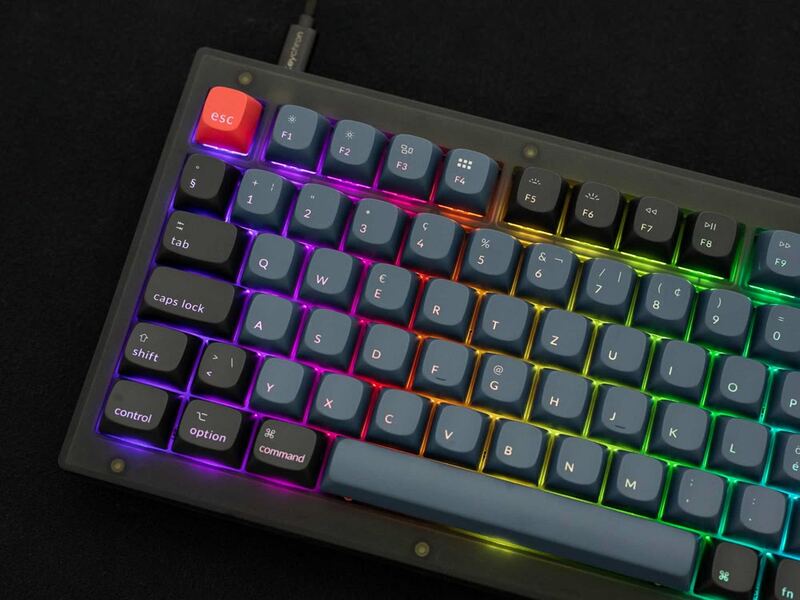
The Keychron V1 (and V1 Max) gets you a stellar typing experience plus hot-swap sockets and QMK/VIA software without spending much. Wireless connectivity and the gasket mount design draw praise; the plastic shell feels cheap and the RGB lighting is weak. As an entry point for enthusiasts willing to accept minor compromises in materials and stabilization, it is excellent.

Strengths
  • Excellent typing experience with Gateron Jupiter switches
  • Hot-swap support for 3-pin switches allows easy customization
  • Reliable wireless connectivity via Bluetooth 5.1 and 2.4 GHz
Watch-outs
  • RGB lighting is described as somewhat weak
  • ABS plastic outer shell feels cheap compared to premium alternatives
  • Spacebar stabilization requires improvement
Logitech G413
Ranked #4 in Best Mechanical Keyboards Under $100
Logitech G413
7 sources$69.99as of Aug 1

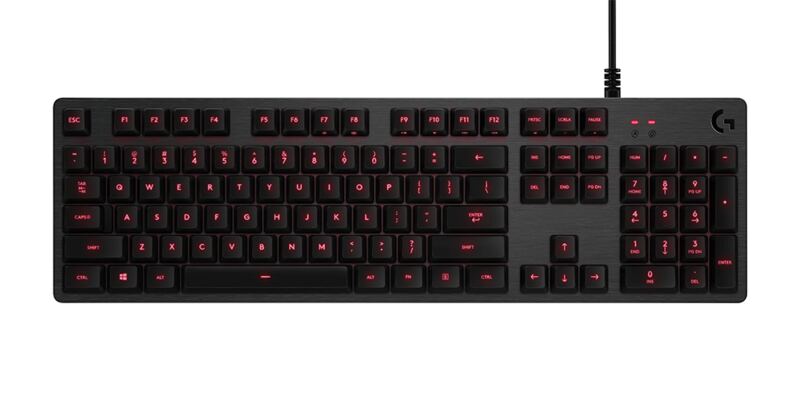
Durable PBT keycaps and responsive Romer-G switches give the Logitech G413 Carbon a solid, premium feel at an affordable price, and the build quality holds up in daily use. Where it falls short is with enthusiasts: there is no customizable per-key RGB lighting and no detachable cable.

Strengths
  • Features durable PBT keycaps that resist shine and wear over time
  • Includes a brushed aluminum top case for a premium, sturdy build feel
  • Offers responsive Romer-G mechanical switches with a 1.5mm actuation point
Watch-outs
  • Lacks per-key RGB lighting, offering only a single-zone red backlight
  • Uses a non-detachable braided USB cable which limits portability

How they stack up

Keychron V1

The Keychron V1 stands out by offering deep QMK/VIA customization and hot-swap support, features completely absent in the Royal Kludge RK61 and Logitech G413. While it shares the aluminum build quality of the HyperX Alloy Origins Core, the V1 sacrifices structural premiumness for a gasket-mounted typing feel and wireless versatility that the HyperX lacks.

Logitech G413

The Logitech G413 distinguishes itself with a premium brushed aluminum top case and durable PBT keycaps, offering a sturdier feel than the plastic-shelled Keychron V1 or Royal Kludge RK61. However, it falls short of the HyperX Alloy Origins Core and Keychron V1 by lacking per-key RGB lighting and any form of advanced programmability or hot-swap capabilities.

Specs side-by-side

SpecKeychron V1Logitech G413
Form Factor75%Full-size
Switch TypeGateron Jupiter (Banana, Brown, Red)Romer-G Mechanical
ConnectivityBluetooth 5.1, 2.4 GHz, USB-CWired USB
BacklightingRGB LEDSingle-zone Red LED
Keycap MaterialABSPBT
Battery LifeUp to 225 hoursNone
Dimensions12.93"L x 5.81"W x 1.04"H16"L x 7"W x 2"H
KeycapsPBT
Keys61
← See the full ranking of best mechanical keyboards under $100