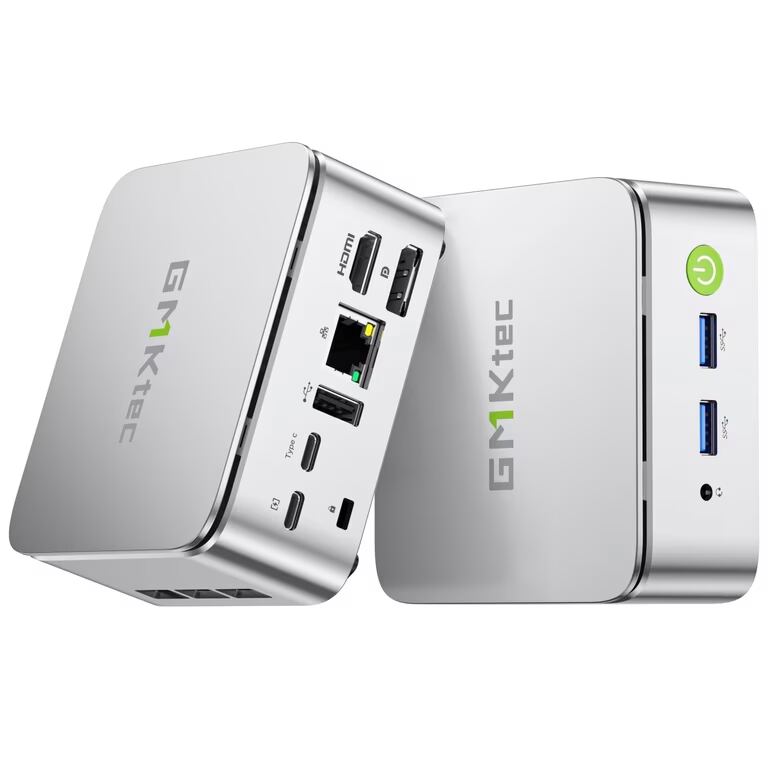
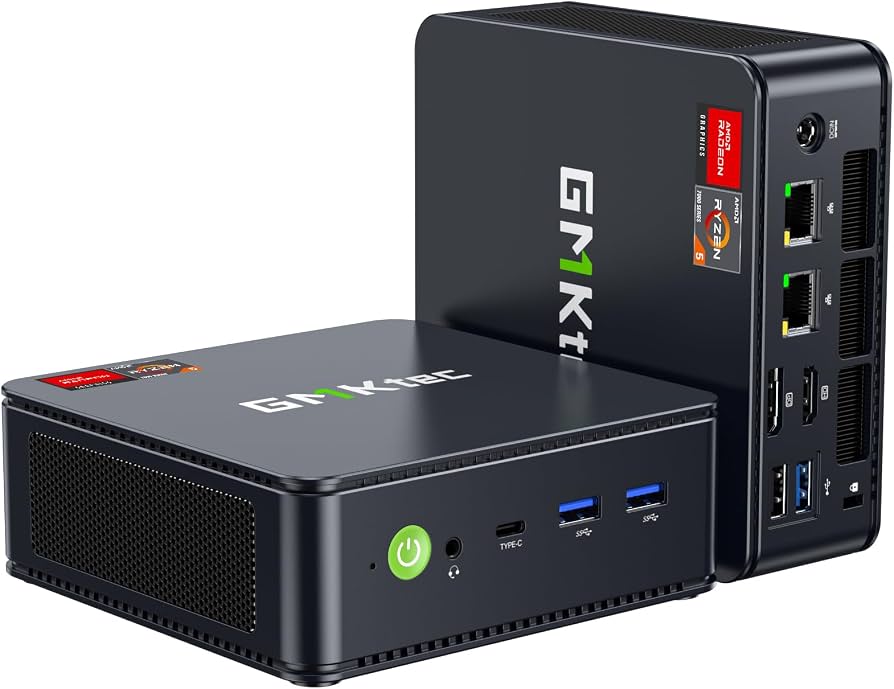
The GMKtec NucBox M6 Ultra delivers strong price-to-performance value through its AMD Ryzen 5 7640HS processor and dual-channel DDR5 RAM, which Notebookcheck found enables smooth multitasking for office environments. Its dual 2.5GbE LAN ports make it a viable network appliance or home server, while teampandory reported that the integrated Radeon graphics handle casual gaming and emulation with ease. However, the plastic chassis feels less premium than aluminum competitors, and blog.lon.tv noted that the built-in Wi-Fi radio is inconsistent compared to wired Ethernet reliability. This mini PC fits users seeking an upgradeable system for light creative work or networking tasks, but those prioritizing wireless stability or a high-end build quality should look elsewhere.
Full review
Ryzen 5 7640HS performance in daily and creative workloads
The AMD Ryzen 5 7640HS processor anchors the NucBox M6 Ultra, delivering six cores and twelve threads that handle everyday computing with noticeable speed. Notebookcheck found that applications launch quickly and multitasking proceeds without any visible delays, making it a solid choice for office environments or home use. The Zen 4 architecture paired with dual-channel DDR5 memory provides enough bandwidth to keep the system responsive even when multiple browser tabs and productivity suites are open simultaneously.
For content creators working within modest constraints, the M6 Ultra proves surprisingly capable. Teampandory reported that editing a 1440p timeline in DaVinci Resolve was smooth, with the high boost clock of the processor compensating for the lack of a discrete GPU. Blog.lon.tv noted that basic cuts and transitions in 4K video were manageable, though heavy effects would likely require proxy workflows.
The processor also handles light creative applications like Photoshop and Lightroom without stuttering. TechRadar highlighted that the combination of the Ryzen chip and Radeon integrated graphics gives the machine an edge over competitors when running Adobe Creative Cloud apps. While it cannot replace a high-end workstation for rendering massive projects, the 7640HS offers enough sustained performance to make light photo editing and moderate multitasking efficient tasks rather than frustrating ones.
Radeon 760M graphics capabilities in gaming scenarios
The integrated AMD Radeon 760M graphics chip, featuring eight RDNA 3 compute units clocked up to 2600 MHz, serves as the primary engine for visual tasks. Blog.lon.tv recorded a score of 2,623 on 3DMark Time Spy, which aligns closely with the performance of an older GTX 1050 Ti discrete card. This level of raw compute power allows the M6 Ultra to handle casual gaming and emulation duties that typically define the boundaries of integrated graphics.
In actual game titles, the experience varies significantly based on resolution and settings. Teampandory clocked frame rates between 70 and 80 FPS in lighter competitive shooters like Rocket League and Dota 2 at 1080p. For heavier AAA titles such as Cyberpunk 2077, performance drops to roughly 25 FPS on low settings, though enabling FSR can push that closer to playable territory around 60 FPS at lower resolutions. Blog.lon.tv observed similar results, noting the system runs games between 30 and 40 FPS at 1080p low settings.
Emulation stands out as a particularly strong use case for this graphics configuration. Teampandory found that the M6 Ultra comfortably handles PSP emulation with upscaling, PlayStation 2 titles, and even select PlayStation 3 games. It also manages Wii, Wii U, and lighter Switch ports effectively. This makes the mini PC an excellent dedicated machine for retro gaming setups where visual fidelity matters more than raw polygon counts of modern blockbusters.
Dual 2.5GbE LAN suitability for network appliance roles
One of the most distinct hardware choices on the M6 Ultra is the inclusion of dual 2.5 Gigabit Ethernet ports, a feature rarely found in consumer mini PCs at this price point. Layer3labs.io emphasized that this configuration transforms the device from a simple desktop into a viable network appliance or small firewall router. Users can run software like pfSense or Untangle to handle traffic routing while simultaneously using the same box as their primary workstation.
For home lab enthusiasts, these ports allow for link aggregation or dedicated upstream/downstream connections that maximize multi-gigabit internet plans. Blog.lon.tv tested both Ethernet jacks and confirmed they delivered full speeds on his multi-gigabit connection, ensuring stable wired performance for heavy data transfers. This reliability contrasts sharply with wireless solutions, making the M6 Ultra a robust choice for users who prioritize consistent bandwidth over convenience.
The dual LAN setup also benefits server applications. Whether hosting local media libraries or running containerized services like Docker, having two dedicated network interfaces prevents bottlenecks when serving files to multiple clients simultaneously. TechRadar noted that this connectivity spec is typically reserved for much more expensive machines, giving the M6 Ultra a significant advantage in environments where wired stability is non-negotiable.
Wi-Fi 6E inconsistency versus wired Ethernet reliability
While the wired networking excels, the built-in Wi-Fi 6E radio presents a notable weakness. Blog.lon.tv reported that wireless speeds were spotty and lagged significantly behind the performance of the dual LAN ports during heavy data transfers. Although download speeds eventually recovered toward the end of his tests, the inconsistency makes the wireless module unsuitable for mission-critical tasks or large file uploads where stability is required.
Another reviewer highlighted this disparity by noting that while Wi-Fi 6E handles occasional browsing and streaming adequately, it fails to match the throughput of a direct Ethernet connection. For users relying on the M6 Ultra as a media server or network node, skipping wireless entirely in favor of cabling is highly recommended. The radio works fine for basic connectivity needs but should not be counted on for high-bandwidth operations.
This limitation is particularly frustrating given that other aspects of the networking hardware are so strong. Users who cannot run an Ethernet cable to their desk may find themselves dealing with fluctuating connection speeds, especially if they attempt to use the machine for tasks like cloud backups or remote desktop sessions over Wi-Fi. The dual LAN ports essentially render the wireless module a secondary feature rather than a primary utility.
Plastic chassis construction and thermal management trade-offs
The exterior of the M6 Ultra is constructed entirely from plastic, a material choice that keeps costs down but compromises the premium feel compared to aluminum-clad competitors. Notebookcheck observed that while the housing feels robust and reliably fulfills its purpose, it lacks the tactile quality of metal enclosures found in higher-end desktops. The design is understated and functional, with ample ventilation slots on the sides and bottom to facilitate airflow.
Thermal management relies on a single internal fan, which introduces acoustic compromises under load. Notebookcheck noted that while temperatures remain within safe green ranges, the fan control logic appears immature, leading to noticeable noise during sustained workloads. One reviewer described an annoying droning sound even at idle speeds in certain BIOS configurations, suggesting that users may need to adjust power profiles to mitigate the pitch of the fan noise.
Power consumption reflects this balance between performance and thermals. Blog.lon.tv measured idle draw at approximately 13 watts, which is efficient for a desktop replacement. However, under full load, power usage spikes to around 90 watts, generating enough heat to keep the fan spinning continuously.
Upgradeability through dual M.2 slots and DDR5 expansion
Unlike many sealed mini PCs that lock users into their initial configuration, the M6 Ultra offers extensive internal upgrade paths. Blog.lon.tv highlighted that the chassis opens easily to reveal two NVMe M.2 slots; one is occupied by the pre-installed drive, leaving a second slot available for additional storage or dual-booting operating systems like Linux. This flexibility allows users to expand their capacity well beyond the base 1TB configuration.
Memory expansion is equally generous, with support for up to 128 GB of DDR5 RAM via two SODIMM slots. Crucially, the system ships with memory installed in pairs rather than single-channel configurations, ensuring that the Radeon 760M graphics receive maximum bandwidth from day one. Teampandory confirmed that this dual-channel setup is essential for unlocking the full potential of both the CPU and the integrated GPU.
The ability to swap out components also extends to the wireless module itself. While the built-in Wi-Fi card may be inconsistent, users can replace it with a higher-quality adapter if wired connectivity is not an option. This level of serviceability makes the M6 Ultra a long-term investment rather than a disposable appliance, allowing owners to adapt the hardware to changing needs without purchasing a entirely new machine.
Display output limitations at 4K resolution
Video connectivity on the M6 Ultra is functional but restricted by refresh rate caps at higher resolutions. Reviewers noted that users seeking smoother motion for gaming or general desktop fluidity will need to drop their resolution to 1440p to achieve higher refresh rates like 120 Hz.
The front USB-C port supports DisplayPort Alt Mode and can theoretically drive an 8K display, but practical implementation has been problematic. One reviewer reported that connecting a Thunderbolt cable to the front USB-C port failed to establish a video signal repeatedly, reverting back to other inputs despite proper reseating and configuration changes. This suggests potential firmware quirks or hardware limitations with the Type-C video output on early units.
For users planning to run multiple high-resolution monitors, the M6 Ultra can drive up to three displays simultaneously using its available ports. However, the 60 Hz cap at 4K means that this setup is best suited for productivity tasks like coding or document editing rather than fast-paced visual work. The limitation is a direct result of the HDMI and DisplayPort versions included on the board, which prioritize resolution compatibility over high refresh rates.
Strengths
- +Strong price-to-performance ratio with an AMD Ryzen 5 7640HS processor and DDR5 RAM.
- +Dual-channel memory configuration ensures the integrated Radeon 760M graphics reach their full potential.
- +Includes dual 2.5GbE LAN ports, making it suitable for home server or network appliance use.
- +Offers extensive upgradeability with two M.2 NVMe slots and support for up to 128 GB of RAM.
Watch-outs
- −Plastic chassis construction feels less premium compared to aluminum competitors.
- −Built-in Wi-Fi radio performance is inconsistent and lags behind wired Ethernet connectivity.
How it compares
The GMKtec NucBox M6 Ultra features dual-channel DDR5 RAM which allows its integrated Radeon 760M graphics to perform well, avoiding the severe bottleneck seen in the single-channel configuration of the Geekom A9 Max.
Rating sources
“For just $389 (direct from the manufacturer) or $389 on Amazon , you get a very solid mini PC that has the potential to outperform some of its competitors.”
“If you’re looking for a mini PC with strong performance for the money , the GMKtec M6 Ultra is one that’s very easy to recommend.”
Our 4.3 score is the average of the 2 scored reviews above; 4 more reviewed it without printing a score and are not in the average. Ratings marked * were derived from the reviewer’s written analysis or video transcript — the publisher didn’t print an explicit numeric score, so we inferred one from their own words. Click through to verify. More about methodology.