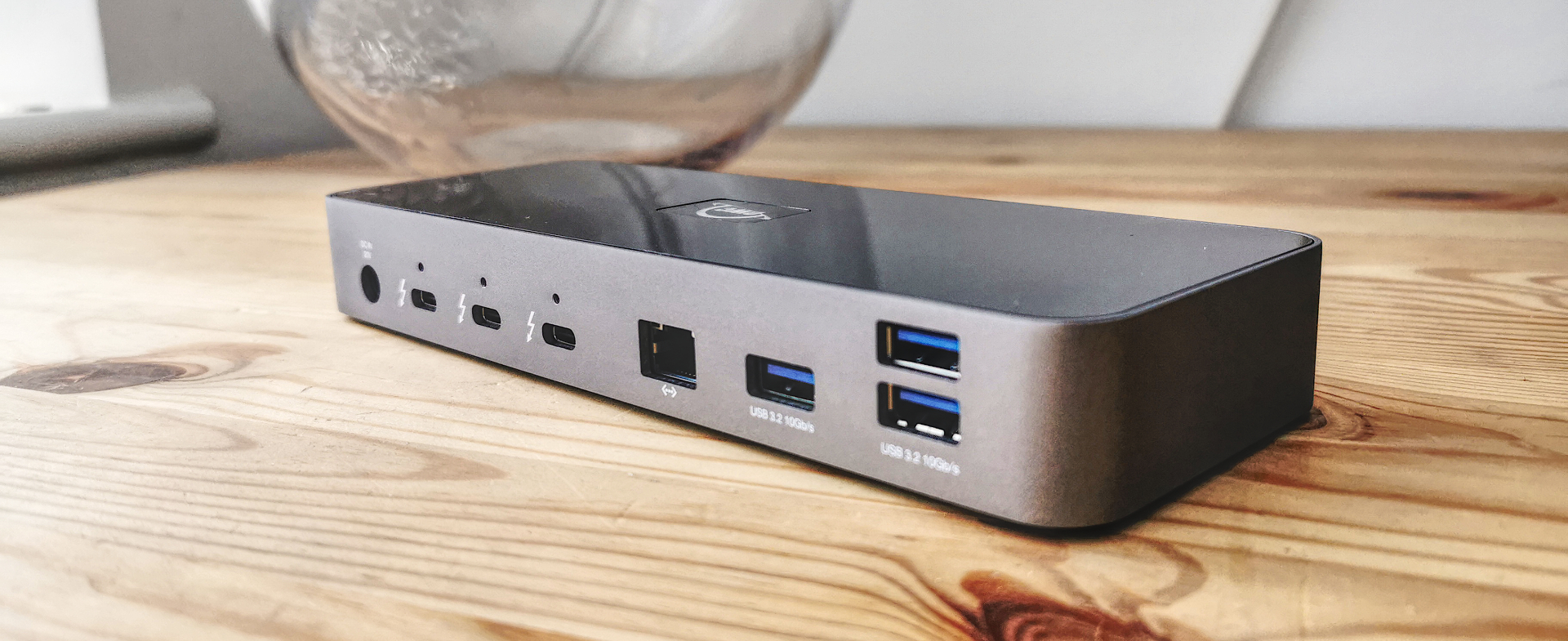
The OWC Thunderbolt 4 Dock is the daisy-chainer's pick: three downstream Thunderbolt 4 ports and a UHS-II card reader make it a favorite for creative workflows, at a price that meaningfully undercuts the CalDigit TS4. docking-stations.info scored it 8/10 and TechRadar praised its construction and flexibility. The lack of HDMI is the main caveat, but for Thunderbolt-heavy setups it is excellent value.
Full review
$249 undercuts the TS4 on price
The OWC Thunderbolt 4 Dock positions itself as the sensible-priced flagship alternative. docking-stations.info gave it 8/10, noting that "at its MSRP of $249, it undercuts competitors like the CalDigit TS4 by a significant margin while still delivering the essentials." TechRadar concurred that "for the functionality available, the cost isn't high and reflects well the quality of its construction."
In daily use it behaves like the dependable Thunderbolt 4 dock it is: a single 40Gb/s host cable feeds displays, networking, drives and peripherals, with 96W flowing back to charge the laptop. It is a no-surprises performer that creative users in particular have come to trust.
Ports and Connectivity
The OWC's standout feature is its three downstream Thunderbolt 4 ports. As TechRadar detailed, the 11-port layout includes "one Thunderbolt 4 uplink and three downlinks, three USB-A 3.2 Gen 2 (10Gbit/s) ports, a single USB-A 2.0, a single Gigabit Ethernet LAN Port, single 3.5mm Audio Jack and an SD Card reader." Those three downstream Thunderbolt ports make it genuinely strong for daisy-chaining external SSDs, RAID arrays and Thunderbolt displays.
The UHS-II SD 4.0 card reader is the other detail creatives care about, enabling fast camera-card offloads. Display support covers a single 8K at 60Hz or dual 4K. The notable omission is HDMI — like the CalDigit TS4, you connect monitors via DisplayPort or the Thunderbolt ports.
96W charging in an aluminum chassis
Tech Advisor's verdict captured the OWC's reputation: "OWC makes solid, good-looking docking stations, and the Thunderbolt Dock is no exception." The aluminum chassis feels premium and is well-suited to a professional desk, and the build quality is a clear step above the plastic-heavy value docks.
With 96W of host charging it keeps most laptops powered while docked, and the construction is rated to handle the always-connected life of a daisy-chained creative workstation. It is the kind of hardware that disappears into a workflow rather than demanding attention.
Setup and Compatibility
The OWC dock is broadly compatible: it works with Macs that have Thunderbolt 3 or later running macOS 11.1 or newer, Windows PCs with Thunderbolt 4, and even non-Thunderbolt USB-C devices like Chromebooks and iPads in a more limited capacity. Setup is plug-and-play with no drivers required.
As with every dock here, base M-series MacBook Air and Pro models remain capped at a single external display by Apple, and full functionality requires a true Thunderbolt 4 (or compatible) host. Within those universal limits, the OWC slots into Mac and Windows workflows alike without fuss.
No HDMI ports and a two-year warranty
The clearest gap is HDMI: there are no HDMI ports, so HDMI-monitor owners need DisplayPort or Thunderbolt cables and adapters, unlike the Plugable TBT4-UD5 and Kensington SD5780T which include HDMI. The total port count is also lower than the CalDigit TS4 and Plugable TBT4-UDZ.
Minor nitpicks include a dated USB 2.0 port among the faster connections and a two-year warranty that trails the three-year coverage some rivals offer. These keep it at third rather than higher, but none undermine its appeal to the daisy-chaining creative buyer it targets.
Three downstream Thunderbolt ports for daisy-chaining
The OWC sits squarely between the value Plugable TBT4-UD5 and the flagship CalDigit TS4. It adds three downstream Thunderbolt 4 ports the UD5 lacks, making it the better daisy-chaining choice, while costing significantly less than the TS4. Against the Kensington SD5780T and Plugable TBT4-UDZ it trades some display flexibility and total ports for its strong Thunderbolt port count and creative-friendly UHS-II reader. For Thunderbolt-heavy creative setups on a sensible budget, it is the sweet spot.
UHS-II speeds for creative pros at $249
The OWC's value pitch is built directly on undercutting the flagship. docking-stations.info's 8/10 verdict was explicit: "at its MSRP of $249, it undercuts competitors like the CalDigit TS4 by a significant margin while still delivering the essentials." For a buyer who wants genuine Thunderbolt 4 daisy-chaining and a fast card reader but balks at the TS4's $400, the OWC hits a deliberate sweet spot.
TechRadar was positive on the value: "for the functionality available, the cost isn't high and reflects well the quality of its construction." It is value defined by giving creatives exactly the ports they use most.
For photographers who daisy-chain Thunderbolt drives
Buy the OWC Thunderbolt 4 Dock if you daisy-chain Thunderbolt drives or displays and want a fast UHS-II card reader at a price well below the CalDigit TS4. It is ideal for photographers, videographers and creative pros whose workflows lean on Thunderbolt peripherals. Look at the Plugable TBT4-UD5 or Kensington SD5780T instead if you need built-in HDMI, or the TS4 if you want the absolute maximum port count.
Strengths
- +Three downstream Thunderbolt 4 ports for daisy-chaining drives and displays
- +UHS-II SD card reader prized by photographers and videographers
- +96W host charging through a single cable
- +Solid, good-looking aluminum construction
- +Undercuts the CalDigit TS4 by a significant margin
Watch-outs
- −No HDMI port, so displays need DisplayPort or Thunderbolt
- −Fewer total ports than the CalDigit TS4 or Plugable TBT4-UDZ
- −USB 2.0 port is a dated inclusion among faster connections
- −Two-year warranty trails some rivals' three years
How it compares
Sits between the value Plugable TBT4-UD5 and the flagship CalDigit TS4: it adds three downstream Thunderbolt 4 ports for daisy-chaining that the Plugable TBT4-UD5 lacks, while undercutting the TS4 on price. Like the TS4 it has no HDMI, where the Plugable TBT4-UD5 and Kensington SD5780T include it, and it carries fewer total ports than the Plugable TBT4-UDZ.
Rating sources
“At its MSRP of $249, it undercuts competitors like the CalDigit TS4 by a significant margin while still delivering the essentials.”
“For the functionality available, the cost isn't high and reflects well the quality of its construction.”
“OWC makes solid, good-looking docking stations, and the Thunderbolt Dock is no exception.”
Our 4.2 score is the average of these published ratings. More about methodology.