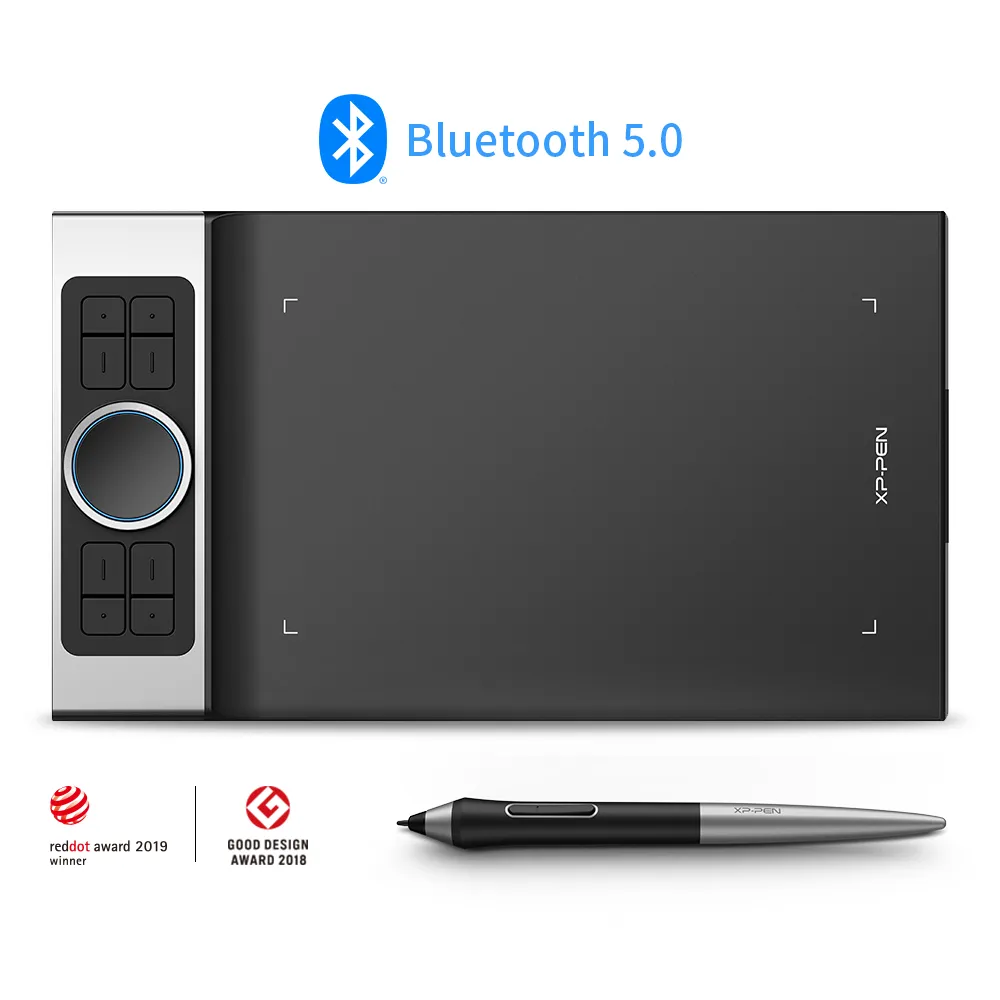
The XP-Pen Deco Pro MW is the budget screenless pick, offering a large active area, a high-pressure battery-free pen and a premium control layout for well under $200. Reviewers including Parka Blogs recommend it easily and Big Red Illustration rated it 4/5 as an accessible entry into digital art. The screenless learning curve and shaky phone support are the trade-offs.
Full review
The Budget Screenless Pick
Every other tablet in this roundup has a screen; the XP-Pen Deco Pro MW deliberately doesn't, and that's the whole point. It's a screenless pen tablet, meaning you draw on its surface while watching the cursor move on your regular monitor. That approach keeps the price well under $200, a fraction of even the entry-level Wacom One 13 Touch, and it's why the Deco Pro MW remains a perennial recommendation for artists on a budget. Parka Blogs called the Deco Pro line "one of the best in the market currently," and Big Red Illustration rated it 4 out of 5 as "an accessible entry point into digital illustration."
The screenless format isn't for everyone, but for those comfortable with the hand-eye separation it offers, it delivers a remarkable amount of capability for the money.
Drawing Performance
Despite the low price, the Deco Pro MW's drawing performance impresses reviewers. It pairs a large 11x6-inch active area with a battery-free stylus offering high pressure sensitivity and 60 degrees of tilt. Parka Blogs found the "drawing performance is excellent and this is definitely good enough for professional artists," high praise for a tablet at this price.
The large active area is a genuine advantage over smaller budget tablets, giving you room for natural, full-arm strokes. Combined with the responsive battery-free pen, it provides a drawing feel that belies its cost, which is the core reason it earns a place alongside displays costing many times more.
Controls and Wireless
The Deco Pro MW carries a premium control layout that's unusual at its price: eight customizable ExpressKeys plus a dual dial wheel (a rotatable aluminum ring around a touch-sensitive center) for zooming, scrolling and brush-size adjustment. That's more on-device control than the Wacom One 13 Touch offers, and it lets you keep your non-drawing hand on the tablet rather than the keyboard.
Connectivity is handled over Bluetooth 5.0, and techgameworld praised the wireless experience, noting a "total absence of latency" and 11-to-12 hours of battery life in its testing. Going wireless removes cable clutter and lets you reposition the tablet freely, a real quality-of-life benefit for a desk-based setup.
Setup and Compatibility
The Deco Pro MW works across Windows, macOS, Android, Chrome OS and Linux, giving it broad compatibility, and it can run wired over USB-C or wirelessly over Bluetooth. Setup is straightforward through XP-Pen's driver, which exposes the ExpressKey and dial customizations. For a budget device, the breadth of platform support is notable and exceeds some pricier competitors.
Unconvincing phone connectivity despite the adapter
The biggest consideration is inherent to the format: drawing on a screenless tablet while looking at your monitor takes practice, and artists used to drawing directly on a display like the Wacom One 13 Touch or Huion Kamvas 16 (Gen 3) will face a learning curve. techgameworld also flagged "unconvincing connectivity and use on smartphones," finding phone usage impractical despite the included adapter, and reviewers noted the 10-to-12-hour battery, while good, can be limiting for very long daily sessions. None of these undercut its value proposition; they simply define who it's for. Some reviewers also noted minor line wobble on slow diagonal strokes and the occasional need to re-pair when switching between wired and Bluetooth modes, small quirks that are easy to live with given the price.
A battery-free pen for less than a display
The XP-Pen Deco Pro MW is the right pick for budget-conscious artists and beginners who are comfortable drawing while looking at their monitor and want a quality pen and premium controls without paying for a screen. It delivers a large active area, a capable battery-free pen and wireless freedom for less than any pen display here. If you'd rather draw directly on a screen, the Wacom One 13 Touch is the affordable entry display; the Huion Kamvas 16 (Gen 3) is the mid-range step up; and professionals should look at the Huion Kamvas Pro 24 or Wacom Cintiq Pro 27.
Strengths
- +Affordable screenless tablet with a large 11x6-inch active area
- +Battery-free stylus with high pressure sensitivity and 60-degree tilt
- +Bluetooth 5.0 wireless with 10+ hours of battery and no perceptible latency
- +Premium controls: 8 ExpressKeys plus a dual dial wheel
- +A fraction of the price of any pen display here
Watch-outs
- −Screenless, so it has a learning curve for those used to drawing on a display
- −Smartphone connectivity and use are unreliable
- −No built-in display means you draw while looking at your monitor
- −Battery life is limited for very long daily sessions
Rating sources
“The XPPen Deco Pro MW (Gen 2) Wireless provides an accessible entry point into digital illustration.”
“XP Pen Deco Pro MW is a full screenless graphics tablet absolutely suitable for your purpose.”
“Drawing performance is excellent and this is definitely good enough for professional artists, and is one of the best in the market currently.”
Our 4.2 score is the average of these published ratings. Ratings marked * were derived from the reviewer’s written analysis or video transcript — the publisher didn’t print an explicit numeric score, so we inferred one from their own words. Click through to verify. More about methodology.