The Wainlux K10 offers a compact, fully enclosed design that allows it to be held in one hand and used safely around children without glasses, as The Gadgeteer found the automatic shield shutdown effective. However, its 80mm x 80mm carving area significantly limits project scale, making it unsuitable for larger items or batch production. Poor Man's DIY noted that while the small footprint aids portability, users needing expansive workspace must look elsewhere. Additionally, the low 3W power restricts the machine to engraving rather than cutting thicker materials.
Full review
Compact footprint and enclosed safety design
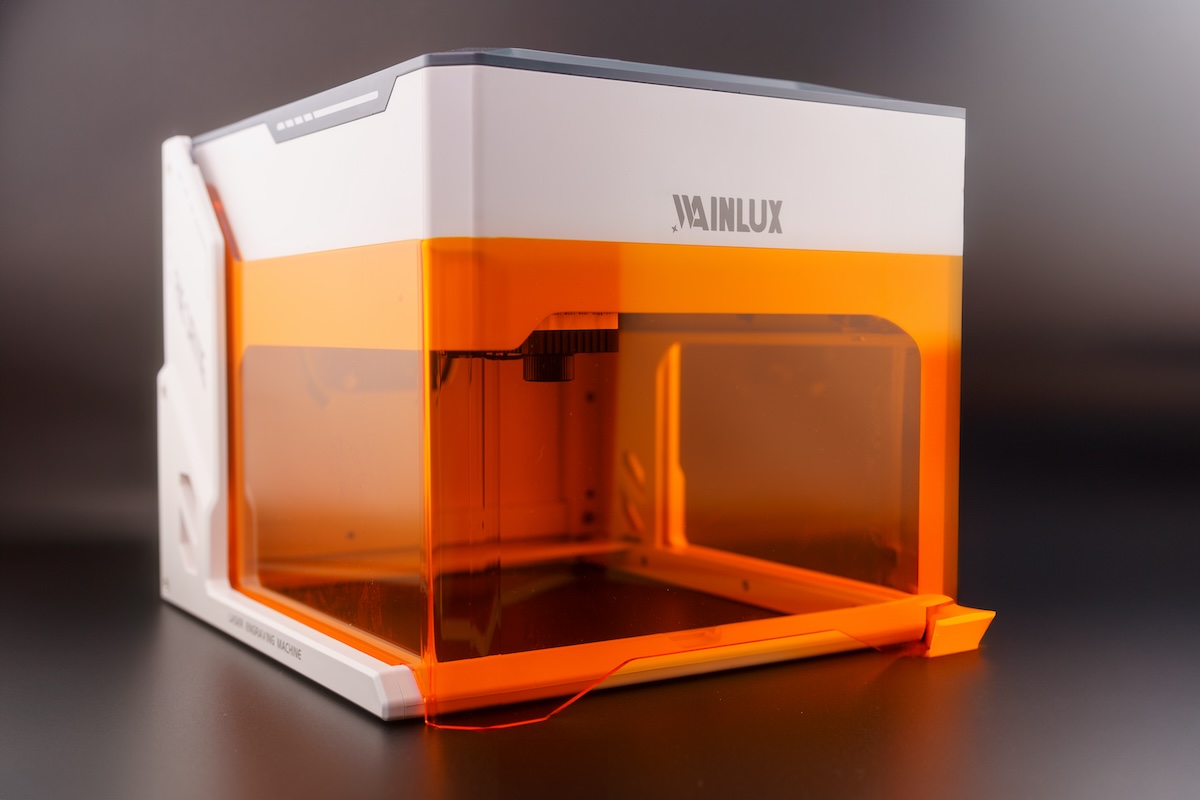
The Wainlux K10 distinguishes itself through a fully enclosed chassis that measures roughly 270mm by 250mm, making it small enough to be held in one hand. TechRadar noted the machine weighs only 1.57 kg and features a white and grey casing with an orange transparent visor that flips down for protection. This enclosure approach contrasts sharply with traditional open-frame diode lasers, offering a contained environment that prevents stray laser light from escaping during operation.
Safety mechanisms are integrated directly into the physical hardware rather than relying solely on software interlocks. The Gadgeteer confirmed that lifting the orange shield automatically stops the laser beam immediately, and tilting the unit more than 13 degrees triggers an automatic shutdown after one second. Poor Man's DIY highlighted this as a primary reason to consider the machine for use around children or in casual home settings where safety glasses might be forgotten.
The open base design allows users to place the entire machine directly on top of larger objects, effectively expanding the usable workspace beyond the fixed 80mm by 80mm laser head area. GoLaserGo demonstrated this capability by positioning the unit over an Xbox console and other large items that would not fit inside a traditional gantry system. This feature makes the K10 uniquely versatile for engraving irregularly shaped or oversized objects, provided they can support the weight of the machine.
80mm carving area limits project scale
The fixed working envelope is strictly limited to an 80mm by 80mm square, which TechRadar identified as a significant drawback for users expecting broader capabilities. While the physical space underneath the laser head spans approximately 145mm by 160mm, any material must fit within that central 3-inch square without overhanging into the open base area where the safety shield cannot close properly.
GoLaserGo pointed out that this limitation is acceptable for small blanks like coasters, patches, and dog tags, but becomes restrictive when attempting larger batch projects or full-size items. The machine requires users to purchase pre-cut blanks or accept that complex designs must be broken down into smaller segments that fit within the 80mm constraint.
Poor Man's DIY observed that while the small area is a drawback for large-scale work, it aligns with the portable nature of the device. Users who prioritize mobility and desktop storage over expansive workspace will find the compact footprint advantageous, whereas those needing to engrave larger surfaces must look toward bigger gantry-style machines.
3W laser power restricts cutting capability
The standard 3-watt diode laser is optimized for surface marking and engraving rather than deep cutting. GoLaserGo explicitly stated that the machine is really only suitable for engraving, as it lacks the raw power to slice through thicker materials quickly or effectively. TechRadar echoed this limitation, categorizing the low-powered laser as a primary con that prevents the K10 from competing with higher-wattage alternatives in material removal tasks.
The Gadgeteer found that initial attempts at engraving resulted in faint marks when using default software settings, requiring manual adjustments to power and speed to achieve dark, defined results. Trial and error on materials like cork coasters revealed that high power settings could cause excessive scorching, while lower settings yielded cleaner engravings suitable for detailed work.
An optional 5-watt laser head is available as an upgrade, but even this increased output remains focused on engraving applications. Poor Man's DIY noted that the included software appears designed primarily for cutting wood on higher-power units, making it less relevant for the K10's actual use case of marking and surface decoration rather than fabrication.
CutLabX app connectivity issues
The proprietary CutLabX software supports Windows, macOS, Android, and iOS platforms, offering a user-friendly interface that TechRadar praised for its ease of use. The application allows users to generate designs directly on mobile devices or computers and send them wirelessly via WiFi to the engraver. GoLaserGo confirmed that the setup process is straightforward, with driver installation occurring automatically when connected via USB-C.
However, connecting via WiFi introduces a significant connectivity trade-off. The Gadgeteer discovered that linking an iPhone or iPad to the laser's local network disconnects the host device from internet access entirely. Users must navigate between the laser's WiFi and their home network to retrieve files or reference online resources, creating a cumbersome workflow for those who rely on cloud-based design tools.
Poor Man's DIY reported additional software glitches when using the mobile app over WiFi. A photo engraving task took ten minutes to load onto the onboard microSD card before the machine failed to execute the job, claiming it was engraving while remaining stationary. Switching to a USB connection on a PC resolved these issues entirely, confirming that the wireless method is less reliable for complex or time-sensitive projects.
Offline operation via microSD card
For users who want to avoid WiFi connectivity problems, the K10 supports offline engraving through a microSD card slot located on the rear panel. GoLaserGo detailed that files must be saved as GCode with the specific filename 001.nc before being inserted into the machine. This feature allows operation in environments where computer access is unavailable or internet connectivity is restricted.
The process involves pressing and holding a physical button for three seconds to initiate engraving mode, with short presses pausing or resuming the job. Poor Man's DIY noted that this offline capability adds versatility, particularly for users who want to set up jobs in advance or operate the machine away from their primary workstation.
TechRadar highlighted the microSD slot as part of a broader ecosystem that includes an optional air purifier and rotary tool attachments. The ability to work offline ensures that the K10 remains functional even when software updates or network configurations temporarily disrupt wireless communication, providing a reliable fallback method for consistent operation.
Focus mechanism and material handling
Focusing the laser requires manual adjustment using a dial on the laser head to achieve the smallest possible light spot. The Gadgeteer emphasized that proper focus is critical for accuracy, recommending users rotate the knob until the dot appears perfectly round on included black paper before beginning any project. Poor Man's DIY observed that the focal point must be rechecked whenever materials are changed or thickness varies.
Poor Man's DIY described an alternative focusing method using a flip-down lever or needle on the laser head, which allows users to lower the module until it touches the material surface. This mechanical approach simplifies the process compared to visual estimation, ensuring consistent distance between the lens and the workpiece for uniform engraving depth.
The open base design necessitates careful placement of materials to ensure they remain stable during operation. GoLaserGo suggested using a tile or positioning template to align objects consistently, especially when batch engraving multiple items. The lack of an automated focusing system means users must invest time in manual calibration to achieve professional-grade results.
Software defaults and workflow gotchas
New designs loaded into CutLabX or LightBurn default to high power settings, often 80 percent, which can damage materials if not adjusted manually. Poor Man's DIY warned that assuming previous settings will persist across different files is a common mistake that leads to scorching or burning through thin substrates like MDF coasters.
The software preview function displays the full bounds of an image rather than just the visible design area, causing confusion when transparent padding surrounds artwork. Poor Man's DIY noted that this discrepancy between the on-screen preview and actual engraving output requires users to carefully prep assets before sending them to the machine.
GoLaserGo recommended building a physical jig or template to compensate for the laser head not homing at the front left corner as expected. The unit homes slightly left of center toward the front, making intuitive placement difficult without a reference guide. This unintuitive behavior adds friction to the workflow but can be mitigated with simple cardboard templates.
Safety shield interruption and resume bugs
The orange safety shield provides excellent protection by stopping the laser immediately when lifted, but it introduces operational interruptions. Poor Man's DIY reported that closing the shield back down does not always allow the machine to resume engraving seamlessly; the software sometimes continues to think the shield is open.
This bug occurs in both the stock CutLabX application and third-party LightBurn software, suggesting a hardware-level detection issue rather than a software glitch. Users must restart jobs or toggle power when this happens, adding frustration during long engraving sessions where frequent adjustments are necessary.
Despite these interruptions, The Gadgeteer acknowledged that the automatic shutdown feature is a thoughtful safety precaution for beginners who may not wear protective eyewear. The shield allows users to monitor progress without special glasses, balancing convenience with hazard prevention in home environments.
Strengths
- +Compact and portable design allows the machine to be held in one hand and easily stored on a shelf.
- +Fully enclosed chassis with an orange flip-down safety shield that automatically stops the laser when lifted or if tilted more than 13 degrees.
- +CutLabX software is user-friendly, compatible with Windows, macOS, Android, and iOS, and supports offline engraving via microSD card.
Watch-outs
- −Small 80mm x 80mm (3.15in) carving area limits the size of projects that can be engraved in a single pass.
- −Low power output restricts the machine to engraving rather than cutting through thicker materials.
- −WiFi connectivity disconnects the host device from internet access while connected to the laser's network.
How it compares
The Wainlux K10’s extremely compact design allows it to be held in one hand, offering portability that the heavy xTool P2 or xTool P3 cannot match. However, its small 80mm x 80mm carving area is significantly more limited than the Creality Falcon A1 Pro's larger workspace, restricting users who need to engrave larger items in a single pass.
Rating sources
“I got to say uh if you're looking for a beginner or a small engraver uh something that you can use in the house simply quickly uh this particular item turned out to be quite nice it's a very versatile”
Our 4.1 score is the average of the 2 scored reviews above; 2 more reviewed it without printing a score and are not in the average. Ratings marked * were derived from the reviewer’s written analysis or video transcript — the publisher didn’t print an explicit numeric score, so we inferred one from their own words. Click through to verify. More about methodology.